Enjoy this insecurity website and how insecure your computer or website in the cyber space.

Sunday, May 31, 2009
What is Insecure.org?
insecure.org is a another cool website I have came cross which gives out lot of information about computer and Internet security. Also insecure.org leads to other security listing websites around. However, my favorite section is security tools.
Labels:
Hack,
password crackers,
security

Friday, May 29, 2009
What is Google Wave?
What is Google Wave? Everyone knows that Google have so many cool free services and as I see Google Wave is trying to combine everything together.
This is what the Google Wave has to say about Google Wave
"A "wave" is equal parts conversation and document, where people can communicate and work together with richly formatted text, photos, videos, maps, and more. "

Google Wave is to be out soon and you can always show your interest by dropping your email and Google wave team will inform you as soon as Google Wave is online.
5 Useful Outlook settings
Outlook is one of the commonly use email client programs. Lets look at couple of useful setting or configurations in Outlook 2003 that will help you to manage your emails after you have successfully set up an email account with Outlook 2003.



1# Automatic Send/Receive
By default after setting up your email account you need to click send/receive button each time to download new emails from server. You can simple automate it.
Click on Tools > click on Options > go to Mail Setup tab > Shedule an automatic Send/Receive every 5 minutes.
You can always change the interval but make sure not to give one minute. Always its better to have 3 minutes to 5 minute interval.
If you have multiple email accounts and if you would like to have different intervals for other accounts you can always define new groups by click in on the New button next to Group Name.
2# Manage Read Emails - Customize option for the reading pane
By default in Outlook 2003 new email will be marked as read when you change the selection. If you would like to change it and you would like to mark it as read only when you open the message in read pane for some times you can always change it.
Click on Tools > click on Options > go to Other tab > click Reading Pane
You will get couple of options
a. Mark Item as read when viewed in the reading pane for where you can tell number of seconds you would like to stay on the message before it marks as read.
b. Mark Item as read when selection change (default)
3# Why You should Auto Archive
With Outlook 2003 or any other outlook versions it is always been a good practice to archive your emails. There is a limitation in Outlook pst file (where emails are saved) . If you have reached the limit (1.8 -1.9 GB) it will not let you download, delete or move any emails. You can create a new pst file and make it default so new emails will download.
Click on Tools > click on Options > go to Other tab > click Auto Archive
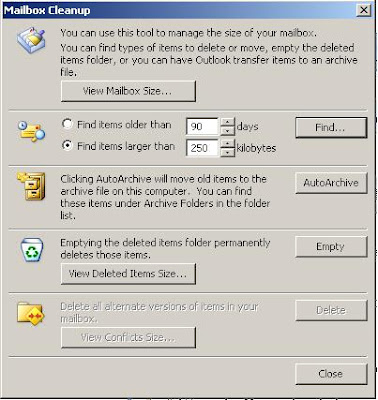
4# Mail Box Clean Up
Mailbox clean up can be used to detect the size of the current inbox and remove the emails that you do not use.
you can check the sizes of each email folder - you know which folder is needed to be treated.
Find the emails by size.
Empty the Deleted Item folder.
Go to Tools > Click on Mailbox Cleanup
5# Ways to Organize Inbox
There are three ways you can organise your inbox.
a. Using Folders
b. Using Colours
c. Using Views
These are quite helpful to organise your emails base on the importance of the email, sender or the situation.
go to Tools > click on Organize
We would like to see what other options you use to organise your Outlook inbox in comments.
Tuesday, May 26, 2009
Must use 3 keyword tools
Knowing the best keywords to be used in your website is one of the major plus point in search engine optimisation (SEO). Selecting a best trustworthy keyword tool is important. If your keyword tool provide wrong or out of date information about the keywords your website might suffer a lot. It will be a waste of time and money.
Google is the biggest player in search engine game and the information given out can be trusted as well. These 3 keyword tools are provided by Google. These three keyword tools cover different areas and can be used in different situations.
# Category search - Over 23 Categories and you can figure out what are the most searched key words for a category such as Computers & Electronics, Entertainment, etc. This might be really useful if you are planning to start a blog.
# Seasonality - You can check which key words are been searched most during a given period of time. For example you can check what are the best keywords to be used during Christmas.
# Geographic distributions - If you are interested in knowing what are the best keywords to be used in your country you can look into that as well.
# Properties - Classic example for this is New York Christmas shopping, 2008. This query will return what New York people searched during the 2008 Christmas time.
#2 Search-Based Keyword tool
This is a simple keyword tool that will help you to analyse the keywords that suits for your website or blog for the AdWords. However, that will give you a general idea about how those keywords can perform and the composition for that key word.
When you enter the website and the keywords you would like to optimise your site for search-based keyword tool will pick up the keywords related to your blog and keywords related your word or phrase. In addition it will show the monthly searches, composition and suggested bid if you are interested in AdWords campaigns.
This is one of the famous, old keyword tool among webmasters and blogmasters. Even though it is targeted on the AdWords you can always use it to have a general idea about the keyword popularity and the composition.
Out of these three my favorite keyword tool is Google insights for search. It is quite flexible and full options and pretty much cover every possible view you would like to know.
Other keywords tools
Google Trends for Websites Pretty basic but You can check what keywords mostly worked for a given website.
Google Trends in general you can see the trend for a given keyword or keyword collection.
What is your favorite keyword tool? Are you using any other keyword tool that really works and can be trusted? Share it with us in the comments.
Labels:
Blog,
Google WebTools,
Website
Friday, May 22, 2009
[Gmail] Preview whats In your Inbox
GMail added a simple but still cool lab feature that will display the top 10 emails in your inbox while Gmail loads the complete inbox. That can save you time if you are trying to check emails from a slow connection.
This is what Gmail blog says about this new Gmail Lab member.
No big deal, really. But now imagine that you access Gmail on a super slow connection from a remote place in Ethiopia where it might take minutes to completely load your inbox. The disappointment is larger when you find out that there is nothing new to read and you could have saved all that time.
To ease this pain a bit, we created a new feature in Gmail Labs called Inbox Preview. While Gmail is loading, a simple, static preview of your inbox with your ten most recent messages is displayed. Turn it on from the Labs tab under Settings, and if you're on a slow connection you'll know from the start if it's worth the wait.
Friday, May 15, 2009
Free magazine subscriptions
Thank you Sriram for sharing this free magazine subscription service with CrazzyCool readers.
Some of the interesting Free Magazines
Oracle Magazine Contains technology strategy articles, sample code, tips, Oracle and partner news, how to articles for developers and DBAs, and more....
The Google Story - Free Book Summary Know in 10 minutes what it takes others hours, and keep up with the latest trends in your industry....
and there are many more free magazines under many categories. Happy reading!!
Wednesday, May 6, 2009
[Windows 7] Some Intel chips don't support Windows 7 'XP mode'
Recently we talked about the things you need to consider buying a Windows 7 compatible computer. This need to be considered if you want your computer to run Windows 7 'XP mode'. According to Ed Bott's Microsoft Report there are Intel processors that doesn't support Windows 7 XP mode.
If you really interested in running Windows 7 XP mode and planning to buy a new computer remember to check CPU supports Intel Virtualization Technology (Intel VT).
If you really interested in running Windows 7 XP mode and planning to buy a new computer remember to check CPU supports Intel Virtualization Technology (Intel VT).
[Blogger Hacks] Increase the Page Views
Page View is a important factor for a website or a blog and I do not have to mentione it in details. Lets have a look at couple of ways that you can improve the number of page views in your Blogger blog.
1# Include the comments area in your blog
By default Blogger blogs will take you to a genaric page (https://www.blogger.com/comment....) when you click on the comment link. It will not add into your number of page views. Simply you can change under Settings > Comments > and select Embedded below post and Save the settings.
# Add internal links to old posts from new posts.
1# Include the comments area in your blog
By default Blogger blogs will take you to a genaric page (https://www.blogger.com/comment....) when you click on the comment link. It will not add into your number of page views. Simply you can change under Settings > Comments > and select Embedded below post and Save the settings.
This will improve your blogger blog page views and give a professional look as your visitors are not taken out of your blog for commenting.
2# Display Custom Google Search result in your blog.
Google Custom Search with or without AdSense is a cool feature for your Blogger Blog which provide your visitors to search through your blog or related blogs and websites. Always remember to embed the search result in to your blog. Check out how to add Google custom search to blogger blog.
You can always use generic methods that any blog master can use to increase the page views.
# Add internal links to old posts from new posts.
# Add banners buttons links to old posts from the side bar, under the header or above the footer.
# Add related posts at the bottom of each posts.
Share your tricks and hacks to improve page views in the comments.
Should I buy or wait till Windows 7?
I need to buy a new computer? Biggest question I have is to buy it now or wait until Windows 7 is out? If I buy a laptop or desktop now will I be able to upgrade from Windows Vista or Windows XP to Windows7 for free? Will my computer compatible with windows 7?
These are the questions running through my head as I am looking to buy a new computer. I am pretty sure if you are looking to buy a new computer you are running through the same set of questions.
What are the minimum requirements for Windows 7?
A PC with these system requirements:
A PC with these system requirements:
- 1 GHz or faster 32-bit (x86) or 64-bit (x64) processor
- 1 GB RAM (32-bit) / 2 GB RAM (64-bit)
- 16 GB available disk space (32-bit) / 20 GB (64-bit)
- DirectX 9 graphics processor with WDDM 1.0 or higher driver
Please note these specifications could change. And, some product features of Windows 7, such as the ability to watch and record live TV or navigation through the use of "touch," may require advanced or additional hardware.
1. When Windows 7 going to be release?
Still there is no exact date you can find but most probably you will be able to get Windows 7 before end of 2009.
If you are planning to buy a computer what you should consider?
2. Hardware configurations.
- 3 GHz or faster 32-bit (x86) or 64-bit (x64) processor
- 3 GB RAM (32-bit) / 2 GB RAM (64-bit)
- 500 GB available disk space
- DirectX 9 graphics processor with WDDM 1.0 or higher driver
So it is always good to buy latest configurations as latest become oldest within couple of months in computer world. Minimum Windows 7 requirements is only to run Windows 7. Always remember you need to run Office, Media Player or other software as well with it.
3. Compatibility
Still I have not seen any compatibility issue with Windows 7. Windows Vista had lot of compatibility issues. Windows 7 BETA run in my old computer without much problem. I do not think there will be much problems with the compatibility.
4. How much it is going to upgrade to Windows 7?
Still Windows 7 is not release. So if you buy a computer now it will come with Windows XP or Windows Vista. Make sure to ask for the deal. May be they might able to give you a free upgrade package from Windows XP, Vista to 7.
Share your experience with buying a new computer and Windows 7 in the comments.
Sunday, May 3, 2009
Google Search right in Gmail
Google and Gmail are part of most the people in front of the computers. Now you can do a Google search from Gmail thanks to new Lab feature. Search result will appear in you Gmail window just like a chat window but bit larger than the chat window.
This is what Gmail official blog says about this new feature.
You can click on a search result and it'll open up in another window (or another tab) so you can make sure it's what you're looking for. Once you're sure it's a result you need, moving your mouse over the result back in Gmail reveals a pull-down menu that lets you do stuff with the search result.
What's in the menu depends on what you're doing in Gmail:
If you're reading a message, you can start a reply to the message with the search result as the first thing in your reply.
If you're writing a message, you can paste the result, or just the URL into your message.
If you're chatting with someone, you can send the result via chat.
You can also always compose a new message to send the search result.
If you have keyboard shortcuts turned on, typing g and then / will take you to the search box when you're not composing, and Ctrl + g will do it when you're composing (that's ⌘ + g for Mac users).
Enjoy this new Gmail Lab feature.
Subscribe to:
Posts (Atom)
