It seems like you can find a software to get most of the computer related stuff done. Even it is legal or illegal. There are softwares to protect you and your data as well as to break them. However, recently I came a cross that it is hard to find a good software to remove the watermark from a picture. Is it true?
Water mark is used to protect the pictures from copying and publishing without authorization. Removing the Water mark is illegal or unethical most of the cases. But there are some cases that you need to remove the water mark in order to use it or present it. What is the best way to remove the water mark?
I am lazy and I do not know much about the Photoshop. I always wanted a free simple software to remove the watermarks. So I can just sit around and see it removing the water mark. Unfortunately best I could find after bit of Googling is that Watermarks removal tool 5.5.7. Unfortunately? Even though it is free and simple (not installation required) I cannot get the work done with it easily. Other than that I could not find a better solution to remove the watermarks.
So here is the manual way to remove watermark using the Photoshop. Really good article explain it simple and clear. Still I would love to see any software to remove and water mark from an image. If you know any please share it with us.
Dose this means water mark is a good way of protecting the Copyright of the images.

Friday, October 30, 2009
Wednesday, October 28, 2009
not a virus then what?
Recent couple of days I have come cross this not-a-virus: Malware. Most of the anti virus programs dose not block, clean or detect this Malware. Kaspersky able to detect and remove not a virus malware. If it is not a virus then what it is? How can it be harmful to you?
According to the definition of this Malware it is not a virus but there are so many types of it. Amazingly these type of malware can be find in many small softwares that can be download for free.
What is not-a-virus?
That can be anything but not a virus. That can be backdoor programs, RemoteAdmin programs, Fraud Tools and etc. These are not harmful like normal viruses. But these can cause many security vulnerabilities. Opening your computer for attackers. Therefore even if you download any of these programs you will not notice any symptoms immediately.
On the other hand these can be something that software are used for its functions. For example not-a-virus:Client-IRC.Win32.mIRC.603 is an IRC chat client nternet Relay Chat is a dedicated network used for real-time communication. However, Kaspersky included this in their extended database because its functionality may be used maliciously. mIRC functionality is often used by virus writers to create backdoors. Users should therefore exercise caution when using this program.
By it self these programs are not a threat but can be used for a attack later. So it is all up to you to download the softwares that are infected with not-a-virus. If you are downloading it from a trusted software company it might be safe otherwise it is pretty hard say what that can be used for.
Most of the Anti virus softwares dose not detect these programs. Kaspersky is one of the programs that detects these and block them and clean the files that are infected with not-a-virus. If you want to check your machine you can always download the Kaspersky trial version and check your machine and clean if there is any not-a-virus infections.
Personally I will not download such programs in to my main computer. But I do not mind in my test machines. But always better to be in safe side.
According to the definition of this Malware it is not a virus but there are so many types of it. Amazingly these type of malware can be find in many small softwares that can be download for free.
What is not-a-virus?
That can be anything but not a virus. That can be backdoor programs, RemoteAdmin programs, Fraud Tools and etc. These are not harmful like normal viruses. But these can cause many security vulnerabilities. Opening your computer for attackers. Therefore even if you download any of these programs you will not notice any symptoms immediately.
On the other hand these can be something that software are used for its functions. For example not-a-virus:Client-IRC.Win32.mIRC.603 is an IRC chat client nternet Relay Chat is a dedicated network used for real-time communication. However, Kaspersky included this in their extended database because its functionality may be used maliciously. mIRC functionality is often used by virus writers to create backdoors. Users should therefore exercise caution when using this program.
By it self these programs are not a threat but can be used for a attack later. So it is all up to you to download the softwares that are infected with not-a-virus. If you are downloading it from a trusted software company it might be safe otherwise it is pretty hard say what that can be used for.
Most of the Anti virus softwares dose not detect these programs. Kaspersky is one of the programs that detects these and block them and clean the files that are infected with not-a-virus. If you want to check your machine you can always download the Kaspersky trial version and check your machine and clean if there is any not-a-virus infections.
Personally I will not download such programs in to my main computer. But I do not mind in my test machines. But always better to be in safe side.
Labels:
Adware,
Malware,
Virus,
Virus scanner

5 ways to secure your Gmail account
Secure and reliable system is not enough to be secure. You are playing a major role in your own security. Specially in cyber space as you can be a targeted in may ways. Gmail team has come up with 5 ways to secure your Gmail account.
1. Remember to sign out.
2. Be careful about sending certain sensitive information via email.
3. Enable "Always use HTTPS.
4. Be wary of unexpected attachments.
5. Make sure your account recovery information is up-to-date.
You can find more details in Gmail Blog. Recently I am been through so many security issues with what to trust and how to trust. Sometimes Anti virus it self will give you a faults information. Therefore do not always depend on something when it comes to security.
6. Keep a separate computer for sensitive data. Do not download programs that you do not know for testing on that computer.
7. Better to use up to date Anti Virus Software. But can it be trusted.
8. Do not write your password some where.
9. Do not use the same password you use in Gmail in other accounts.
10.Do not give any of your password to others.(They might understand your pattern)
11.Do not think that you have nothing to loose. Compromising your email can be used in many ways.
Official Gmail Blog: Gmail account security tips
1. Remember to sign out.
2. Be careful about sending certain sensitive information via email.
3. Enable "Always use HTTPS.
4. Be wary of unexpected attachments.
5. Make sure your account recovery information is up-to-date.
You can find more details in Gmail Blog. Recently I am been through so many security issues with what to trust and how to trust. Sometimes Anti virus it self will give you a faults information. Therefore do not always depend on something when it comes to security.
6. Keep a separate computer for sensitive data. Do not download programs that you do not know for testing on that computer.
7. Better to use up to date Anti Virus Software. But can it be trusted.
8. Do not write your password some where.
9. Do not use the same password you use in Gmail in other accounts.
10.Do not give any of your password to others.(They might understand your pattern)
11.Do not think that you have nothing to loose. Compromising your email can be used in many ways.
Official Gmail Blog: Gmail account security tips
Tuesday, October 27, 2009
Introducing Google Social Search
Search engine king Google allows you to search through all the social network sites for more real time search.
This is Google introduction to their new ability to search friends and contacts.
Your friends and contacts are a key part of your life online. Most people on the web today make social connections and publish web content in many different ways, including blogs, status updates and tweets. This translates to a public social web of content that has special relevance to each person. Unfortunately, that information isn't always very easy to find in one simple place. That's why today we're rolling out a new experiment on Google Labs called Google Social Search that helps you find more relevant public content from your broader social circle. It should be available for everyone to try by the end of the day, so be sure to check back.
Read more
Official Google Blog: Introducing Google Social Search: I finally found my friend's New York blog!
This is Google introduction to their new ability to search friends and contacts.
Your friends and contacts are a key part of your life online. Most people on the web today make social connections and publish web content in many different ways, including blogs, status updates and tweets. This translates to a public social web of content that has special relevance to each person. Unfortunately, that information isn't always very easy to find in one simple place. That's why today we're rolling out a new experiment on Google Labs called Google Social Search that helps you find more relevant public content from your broader social circle. It should be available for everyone to try by the end of the day, so be sure to check back.
Read more
Official Google Blog: Introducing Google Social Search: I finally found my friend's New York blog!
Monday, October 26, 2009
KB970892 update failed
SQL Server 2005 Service Pack 3 update KB970892 has been failed in Windows 2003 for some reason and it is keep on stopping the SQL services every time it tries to install the update. Lets see how it can be solved in details.
Windows update related to SQL server Service pack 3 (KB970892) is been failing to install in Windows XP, Windows 2003 Environments. If you have a close look at the Event Viewer you can notice couple of Error messages related to this.
Product: Microsoft SQL Server 2005 Express Edition - Update 'GDR 4053 for SQL Server Database Services 2005 ENU (KB970892)' could not be installed. Error code 1603. Additional information is available in the log file C:\Program Files\Microsoft SQL Server\90\Setup Bootstrap\LOG\Hotfix\SQL9_Hotfix_KB970892_sqlrun_sql.msp.log.
Annoying part is if the Windows Update is set to Automatic them every time it tries this update will stop the SQL services which cause SQL Database driven websites to go offline.
Simple Registry Hack will fix this issue. I tried it on Windows 2003 Server and it should work on Windows XP in the same way around. Source NetScanTool Pro Inside Out Comment.
1. Go to Run, type regedit, and click ok, or press Enter.
2. Back up your registry, if you don't know how to do this, google it...
3. In Regedit, go to [HKEY_LOCAL_MACHINE\SOFTWARE\Microsoft\Microsoft SQL
Server\MSSQL.1\Setup]
4. find the Resume REG_DWORD, and change its decimal value from 1, to 0.
5. Check MSSQL.2 and MSSQL.3 for the Resume key and change the value to 0 from 1.
HKEY_LOCAL_MACHINE\SOFTWARE\Microsoft\Microsoft SQL Server\MSSQL.2\Setup
HKEY_LOCAL_MACHINE\SOFTWARE\Microsoft\Microsoft SQL Server\MSSQL.3\Setup
5. install the update, and restart the machine.
This worked like a magic and solve the KB970892 installation problem.
![Reblog this post [with Zemanta]](https://lh3.googleusercontent.com/blogger_img_proxy/AEn0k_vnNdqGbPog2Z-AQ6aIyWTQYWMjyhccYvmAGJ-O8B8P98nAY4f2oDkJqbCFGGDfV1Tji5E65xbQxTvDyTSXzd-XRPoYUsr6cmWTP_5KoG1AYFXUTRgEg47wZJscjJeFaCnK-peKFScGK3gO4ONsUZ8=s0-d)
Windows update related to SQL server Service pack 3 (KB970892) is been failing to install in Windows XP, Windows 2003 Environments. If you have a close look at the Event Viewer you can notice couple of Error messages related to this.
Product: Microsoft SQL Server 2005 Express Edition - Update 'GDR 4053 for SQL Server Database Services 2005 ENU (KB970892)' could not be installed. Error code 1603. Additional information is available in the log file C:\Program Files\Microsoft SQL Server\90\Setup Bootstrap\LOG\Hotfix\SQL9_Hotfix_KB970892_sqlrun_sql.msp.log.
Annoying part is if the Windows Update is set to Automatic them every time it tries this update will stop the SQL services which cause SQL Database driven websites to go offline.
Simple Registry Hack will fix this issue. I tried it on Windows 2003 Server and it should work on Windows XP in the same way around. Source NetScanTool Pro Inside Out Comment.
1. Go to Run, type regedit, and click ok, or press Enter.
2. Back up your registry, if you don't know how to do this, google it...
3. In Regedit, go to [HKEY_LOCAL_MACHINE\SOFTWARE\Microsoft\Microsoft SQL
Server\MSSQL.1\Setup]
4. find the Resume REG_DWORD, and change its decimal value from 1, to 0.
5. Check MSSQL.2 and MSSQL.3 for the Resume key and change the value to 0 from 1.
HKEY_LOCAL_MACHINE\SOFTWARE\Microsoft\Microsoft SQL Server\MSSQL.2\Setup
HKEY_LOCAL_MACHINE\SOFTWARE\Microsoft\Microsoft SQL Server\MSSQL.3\Setup
5. install the update, and restart the machine.
This worked like a magic and solve the KB970892 installation problem.
Labels:
error,
Microsoft,
SQL,
windows 2003,
Windows 2003 Server,
Windows Registry,
Windows XP
Sunday, October 25, 2009
Network Security - Useful Linux Command
Here is couple of really useful commands that will help you analyzing the your network security. Can be useful in checking the vulnerabilities of your network computers.
Network Security
1. Change Password 'passwd root' - for knoppix 'passwd knoppix'
2. Stop LAS Type 'halt' take out the CD-ROM, and press 'RETURN'
3. Set up IP 'Net Card Config' program. Apps -> Net -> Net Config menu selection
4. Get IP machine details /sbin/ifconfig
ifconfig eth0 down
ifconfig eth0 up
5. macchanger eth0
6. Connect USB
mkdir /mnt/flash
mount /dev/sda1 /mnt/flash
umount /mnt/flash
7. Change User su knoppix
8. port mapping 'nmap -P0
or Nmapfe
9. scp USERNAME@192.168.0.254:/home/netsec/rc.firewall /etc/init.d/rc.firewall
10. Restart Firewall /etc/init.d/rc.firewall restart
11. Iptables
12. setting: -rwsr--r--. The SUID Root bit (s) means a normal user running the program will have root privileges while that command is executed
13. su – knoppix su root
14. touch /tmp/access-control-tes
15. /etc/group /etc/passwd /etc/shadow
/etc/ssh/sshd_config
man -S5 passwd
16. Groups
17. chmod', 'chown', 'chgrp
18. Apps -> Net -> Monkey Web Server -> monkey start
19. john /etc/shadow
20. ssh root@COLLEAGUE-IP-ADDRESS
21. Apps -> Net -> Monkey Web Server -> monkey start
22. apropos crypt'. What other cryptographic services
23. md5sum /tmp/crypt.3.g
24. Check Running Processors ps –uroot
25. Stop Process kill PID
26. ssh -l knoppix
ssh-keygen -t rsa -b 2048
ssh-agent
ssh-add
ssh-keygen
27. start ssh-agent by typing 'ssh-agent bash
exit the shell created by ssh-agent
28. route add -net 10.0.0.0 netmask 255.255.255.0 dev lo
29. route
30. traceroute
31. ping
32. nmap
33. telnet
34. arping
35. honeyd
36. Start the 'Ethereal' packet capturing 'ethereal &' in a terminal or from the menu 'Apps -> l.a.s.
37. 'Capture->Start', use the 'lo' interface and start capturing network traffic within your own machine
38. Intrusion detection
start 'snort, a network-based intrusion detection snort -A full -c /etc/snort/snort.conf
39. /var/log/syslog' and '/var/log/messages
40. Chkrootkit
41. Ettercap
42. Vulnerability analysis nessusd start the Nessus client: 'nessus &'
43. Virtual Private Networks (VPNs)
ssh username@ -L local-port:destination-host:destination-port
ssh knoppix@192.168.0.30 -L 10000:localhost:80 sleep 99999
44. nc -v localhost 10000
45. localhost [127.0.0.1] 10000 (?) open
Network Security
1. Change Password 'passwd root' - for knoppix 'passwd knoppix'
2. Stop LAS Type 'halt' take out the CD-ROM, and press 'RETURN'
3. Set up IP 'Net Card Config' program. Apps -> Net -> Net Config menu selection
4. Get IP machine details /sbin/ifconfig
ifconfig eth0 down
ifconfig eth0 up
5. macchanger eth0
6. Connect USB
mkdir /mnt/flash
mount /dev/sda1 /mnt/flash
umount /mnt/flash
7. Change User su knoppix
8. port mapping 'nmap -P0
or Nmapfe
9. scp USERNAME@192.168.0.254:/home/netsec/rc.firewall /etc/init.d/rc.firewall
10. Restart Firewall /etc/init.d/rc.firewall restart
11. Iptables
12. setting: -rwsr--r--. The SUID Root bit (s) means a normal user running the program will have root privileges while that command is executed
13. su – knoppix su root
14. touch /tmp/access-control-tes
15. /etc/group /etc/passwd /etc/shadow
/etc/ssh/sshd_config
man -S5 passwd
16. Groups
17. chmod', 'chown', 'chgrp
18. Apps -> Net -> Monkey Web Server -> monkey start
19. john /etc/shadow
20. ssh root@COLLEAGUE-IP-ADDRESS
21. Apps -> Net -> Monkey Web Server -> monkey start
22. apropos crypt'. What other cryptographic services
23. md5sum /tmp/crypt.3.g
24. Check Running Processors ps –uroot
25. Stop Process kill PID
26. ssh -l knoppix
ssh-keygen -t rsa -b 2048
ssh-agent
ssh-add
ssh-keygen
27. start ssh-agent by typing 'ssh-agent bash
exit the shell created by ssh-agent
28. route add -net 10.0.0.0 netmask 255.255.255.0 dev lo
29. route
30. traceroute
31. ping
32. nmap
33. telnet
34. arping
35. honeyd
36. Start the 'Ethereal' packet capturing 'ethereal &' in a terminal or from the menu 'Apps -> l.a.s.
37. 'Capture->Start', use the 'lo' interface and start capturing network traffic within your own machine
38. Intrusion detection
start 'snort, a network-based intrusion detection snort -A full -c /etc/snort/snort.conf
39. /var/log/syslog' and '/var/log/messages
40. Chkrootkit
41. Ettercap
42. Vulnerability analysis nessusd start the Nessus client: 'nessus &'
43. Virtual Private Networks (VPNs)
ssh username@
ssh knoppix@192.168.0.30 -L 10000:localhost:80 sleep 99999
44. nc -v localhost 10000
45. localhost [127.0.0.1] 10000 (?) open
Labels:
Linux,
Network Monitoring,
security
Thursday, October 22, 2009
Why Google Feedburner Sends 22 September Post
I have notice that today (22nd Octomber) that one of our old post (22nd September) is going through the Google Feeds. Sorry about the inconvenience and we are investigating how it really happened.
If you got Google Stuff up one of the old posts in crazzycool Please ignore it and it is due to some fault or confusion in Google fed burner. Crazzycool is sorry about the inconvenience.
If you got Google Stuff up one of the old posts in crazzycool Please ignore it and it is due to some fault or confusion in Google fed burner. Crazzycool is sorry about the inconvenience.
Labels:
CrazzyCool,
error,
Google
Wednesday, October 21, 2009
Affiliate Programs Vs Pay Per Click (PPC)
Affiliate Programs and Pay Per Click (PPC) adverticing programs are popular among people who make or trying to make a income from their website or blogs. Lets have a quick look on these two methods how these method can help you make money.
Affiliate Marketing is an Internet-based marketing practice in which a business rewards one or more affiliates for each visitor or customer brought about by the affiliate's marketing efforts. It is an application of crowdsourcing. (Wikipedia).
In another words you will sell someone else product and you will get a commition for number of sells or referals you 've done. To make money using Affiliate Programs you need to build the trust among your readers. Thousands of traffic to your page will not enough. Your readers should believe what you are saying. Need to build the trust
Pay per click (PPC) is an Internet advertising model used on search engines, advertising networks, and content sites, such as blogs, in which advertisers pay their host only when their ad is clicked. With search engines, advertisers typically bid on keyword phrases relevant to their target market. Content sites commonly charge a fixed price per click rather than use a bidding system. (Wikipedia)
This is quite easy method comparing to Affiliate or any other online money making hacks. Pay per click Advertising allows you to make money from the visitors who bounce away from your blog. More traffic you bring to the page will directly increase the income.
This is quite easy method comparing to Affiliate or any other online money making hacks. Pay per click Advertising allows you to make money from the visitors who bounce away from your blog. More traffic you bring to the page will directly increase the income.
Labels:
Affiliate,
Money,
Pay Per Click
[Blogger Hack] How to add a Wider Image to Blogger
One of the best way to add a image to Blogger Blog background or to any other place in your template is to upload it to the Picasa Web Album and give the link in the blogger template. However, If you are trying to add a wider image (eg 900px width) for some reason you will not get the original width with the image when you add it to the blog.
Simples way to solve this problem is to add the image to the blogger header with the original size and after adding it go to your blog and refresh it to see the changes. Right click on the image and open Image with new tag or copy the image URL. Then copy that URL where you want to display the image and you can remove the header image and apply the correct image.
I am not exactly sure why Picasa is reducing the original width when the image width go beyond some limit but this little trick give a good solutions for that.
Simples way to solve this problem is to add the image to the blogger header with the original size and after adding it go to your blog and refresh it to see the changes. Right click on the image and open Image with new tag or copy the image URL. Then copy that URL where you want to display the image and you can remove the header image and apply the correct image.
I am not exactly sure why Picasa is reducing the original width when the image width go beyond some limit but this little trick give a good solutions for that.
Monday, October 19, 2009
[Blogger Hacks] Different look for Home Page and Post Page
It is some times quite nice to have two different layouts for your blogger blog home page and post page. Main reason behind it is to highlight the post content more in the post page and give a general overview of your blog in the home page. It will definitely increase the reader ship of your blog.
Default Blogger templates dose not follow this kind of layout. It is pretty much running the same template for the home page as well as for the post page. But it is quite possible to do a pretty decent two different layout for home page and post page.
As you know CSS will come in handy in this process and you need to have a little idea about how CSS is working and get things done in CSS in order to make it work. Only reason why I am telling this is that from CSS you can control the layout as you want and it totally depends on the layout you want to have. I can alway help in that case if you tell me what exactly you want to achieve. If you feel bit lazy you can find so many advanced template in blogger template sites.
Let have a look how we going to control the Blogger blog layout. Before you start make sure that current template is backed up and keep it in a safe place.
There is a HTML code that you can use to check whether you are in a blogger blog post page or different page.
That is
This will only apply the code inside this tag when you are not in blogger post page. That means when you are in your home page it applies the code inside this if condition.
Best part is you can apply the same condition for the style sheet of your blog. That mean you can have two different style sheet for your blog. One will apply when you are in home page and the other one applies when you are in the blogger post page.
Following is a sample CSS with the conditions.
This CSS will control your blog template as follows. In the homepage it will make your posts width to 380px and when you go to post it will be 780px. Also when you are in the home page it will not show you the labels, author or the backlinks option. But it all will be there in the post page.
This is just a sample and you can do many things base on your imagination. So if you need any help I would love to help you getting your blog cool. Leave comment or use the contact me form to drop a message.
Default Blogger templates dose not follow this kind of layout. It is pretty much running the same template for the home page as well as for the post page. But it is quite possible to do a pretty decent two different layout for home page and post page.
As you know CSS will come in handy in this process and you need to have a little idea about how CSS is working and get things done in CSS in order to make it work. Only reason why I am telling this is that from CSS you can control the layout as you want and it totally depends on the layout you want to have. I can alway help in that case if you tell me what exactly you want to achieve. If you feel bit lazy you can find so many advanced template in blogger template sites.
Let have a look how we going to control the Blogger blog layout. Before you start make sure that current template is backed up and keep it in a safe place.
There is a HTML code that you can use to check whether you are in a blogger blog post page or different page.
That is
<b:if cond='data:blog.pageType != "item"'>
This will only apply the code inside this tag when you are not in blogger post page. That means when you are in your home page it applies the code inside this if condition.
Best part is you can apply the same condition for the style sheet of your blog. That mean you can have two different style sheet for your blog. One will apply when you are in home page and the other one applies when you are in the blogger post page.
Following is a sample CSS with the conditions.
#main-wrapper {
width:780px;
float: $startSide;
}
<b:if cond='data:blog.pageType != "item"'>
<style>
#main-wrapper {
width:380px;
float: $startSide;
}
.post-labels{display:none;}.post-author{display:none;}
.post-backlinks{display:none}
.post-body{padding:0px;}
</style>
</b:if>
This CSS will control your blog template as follows. In the homepage it will make your posts width to 380px and when you go to post it will be 780px. Also when you are in the home page it will not show you the labels, author or the backlinks option. But it all will be there in the post page.
This is just a sample and you can do many things base on your imagination. So if you need any help I would love to help you getting your blog cool. Leave comment or use the contact me form to drop a message.
Friday, October 16, 2009
Google Docs previews in GMail
Small but effective new GMail Lab feature if you are sending and receiving so many Word and Excel files.
Starting today, you can preview the contents of a Google document, spreadsheet, or presentation right in your Gmail inbox — just like you've already been able to do with YouTube videos, Yelp reviews, and Picasa and Flickr albums. Gmail will automatically detect when you receive a document link and display the name and type of doc below the email.
Official Gmail Blog: New in Labs: Google Docs previews
Starting today, you can preview the contents of a Google document, spreadsheet, or presentation right in your Gmail inbox — just like you've already been able to do with YouTube videos, Yelp reviews, and Picasa and Flickr albums. Gmail will automatically detect when you receive a document link and display the name and type of doc below the email.
Official Gmail Blog: New in Labs: Google Docs previews
Wednesday, October 14, 2009
First Look at Google Wave
How cool is to see the Google Wave invitation from Google Wave Team. Just got it in my inbox and straight away jump in to the next generation of social networking emailing micro blogging or [i am lost].
Here is how things looks like when I jump in.

We will be sharing Google Wave hacks tricks and tweaks as well as invitations in future.
Here is how things looks like when I jump in.

We will be sharing Google Wave hacks tricks and tweaks as well as invitations in future.
Labels:
Google Wave
Official Gmail Blog: New in Labs: Got the wrong Bob?
Gmail Labs came up with new lab feature to check whether you have include a wrong person to the email. Sounds pretty intelligent and Google is good at this.
This what GMail team says about this new cool feature.
"Got the wrong Bob?" is a new Labs feature aimed at sparing you this kind of embarrassment. Turn it on from the Labs tab under Gmail Settings, and based on the groups of people you email most often, Gmail will try to identify when you've accidentally included the wrong person — before it's too late.
Official Gmail Blog: New in Labs: Got the wrong Bob?
This what GMail team says about this new cool feature.
"Got the wrong Bob?" is a new Labs feature aimed at sparing you this kind of embarrassment. Turn it on from the Labs tab under Gmail Settings, and based on the groups of people you email most often, Gmail will try to identify when you've accidentally included the wrong person — before it's too late.
Official Gmail Blog: New in Labs: Got the wrong Bob?
Who is the best? Best out of best?

Can you really say what is the best or what it the worst? Even good? Different Operating systems have different targets, different requirements set. More than that there is a different budget. So before we decide what is the best operating system you might have to think about that as well.
What is secure or what is not secure. In terms of security if some one is boasting my system is secure I can bet you that you have the least secure system around. That is simply because conditions change rapidly and you might be secure today but not tomorrow. How can you measure it. Most of the time we tend to call it secure if we are protected to known vulnerabilities. How about the things that never occurred?
What I use and what I am familiar with is the best OS?
I believe what I have been using for sometimes and familiar OS is the best. Because I know how to get things done. I know all the hacks tricks and tweaks for it. Do you?
For some reason I can get things done with a slow old computer with less RAM and computational power. Where others struggle to move the mouse. Thats a secret.
You can see people argue that Windows is better than MAC, MAC is better than any other operating system. You cannot beat power of Unix and Linux.
Lets take it in another way? Imagine only one operating systems exists with its current status. (Because when there is no competition things can be changed. Specially price and quality). Come up with one cool thing for the main Operating systems that you can find (Windows, MAC, Linux & UNIX). How would the world goes only with Windows? or MAC or Linux & Unix?
![Reblog this post [with Zemanta]](https://lh3.googleusercontent.com/blogger_img_proxy/AEn0k_uEwm1ybU8a6FFlgUI5IAGbbQHWqF1jVjJMwiUTeHfO47p8GUGqnLRjtXBEp_t3XDh6xYMG0PYXXXxcz65o_50gr9cTYHAbHHZ_BtuxioNSBBax9UU4HGEfVXgD03-YABjWXg6Wh3yGQ3eWcu6onne5=s0-d)
Labels:
Linux,
MAC,
Operating System,
PC
Dont have a Google Voice ask your friend for one
Google has extended the Google Voice invitation to the next level. Start giving out invitations to the Google Voice users to invite their friends and family. So if you do not have a Google voice account may be your friend dose.
Labels:
Google,
Google Voice
Monday, October 12, 2009
[Crazzycool Promotion] Win LAlarm Corporate Licences worth $150
October is here and after the successful demonoid invitation giveaways competition 1 & 2 we decide to give some thing really cool. We are giving out Three LAlarm Corporate licences worth $50.00 each for free. LAlarm is one of the effective way to protect your laptop and its data been stolen. Hurry up this competition only going to be open 8 days (20/10/2009).
What is LAlarm and how it can help you?

d its data. If you have a bad experience loosing data or laptop been stolen you can share it with us as well.
Leaving a comment earns +1 Point (valid email address and login is required)
Additional points can be earned following way
* Tweet this promotion +1 Point
* Tweet about Lalarm with http://www.lalarm.com/ +1 Point
What is LAlarm and how it can help you?
LAlarm sounds an alarm when a laptop is in danger of being stolen or losing data, and it can recover and destroy data if the laptop is stolen. LAlarm consists of five alarms and other security functions designed to protect laptops and sensitive data. More information can be found at LAlarm.
The Corporate licence is worth $50!!
Entering the competition is pretty easy.
All you have to do is leave a comment (more than 100 words) against this post telling us why you would like the LAlarm and how you going to use it protect your laptop an
The Corporate licence is worth $50!!
Entering the competition is pretty easy.
All you have to do is leave a comment (more than 100 words) against this post telling us why you would like the LAlarm and how you going to use it protect your laptop an
Leaving a comment earns +1 Point (valid email address and login is required)
Additional points can be earned following way
* Tweet this promotion +1 Point
* Tweet about Lalarm with http://www.lalarm.com/ +1 Point
Leave your tweeted link in your comment as well.
More points you get more chances of winning.
More points you get more chances of winning.
<
3 winners will picked randomly and notify at the end of the competition. Each Winner will get a LAlarm Corporate License worth $50.00.
Competition closed on 20/10/2009 (8 days).
3 winners will picked randomly and notify at the end of the competition. Each Winner will get a LAlarm Corporate License worth $50.00.
Competition closed on 20/10/2009 (8 days).
Labels:
Data Recovery,
Laptop,
Promotions
Saturday, October 10, 2009
Looking back at Oldest Computers
This is some thing really old but still interesting. Really old means actually it goes up to the early days of the computers. Now of course we have really cool computers in may forms Desktop to palmtops even mobile phone is a complex device. Can you think of having this on your lap or even in your room?
Thought it would be interesting to share these pictures with you.
 This is how they design the programs. Before it goes to the implementation.
 Will this fit your room?
 Is this looks like your office desk?
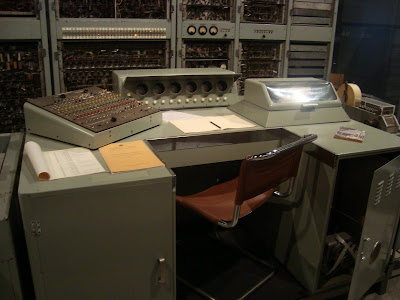
 Any way we should not forget that this is what brought you to the computers what we use today.
Thought it would be interesting to share these pictures with you.
 This is how they design the programs. Before it goes to the implementation.
 Will this fit your room?
 Is this looks like your office desk?
 Any way we should not forget that this is what brought you to the computers what we use today.
Labels:
Computer
Thursday, October 8, 2009
What is 44tips?
Are you lost in the cyber space? Do you remember all the forums, social networks, blogs and all sort of web sites you have joined? How many interesting sites you might have forgotten over the time? To be honest I have no clue. 44tips came up with a simple but cool idea to solve this problem.
What is 44tips?
44tips helps you Create a start page with everything you love!
Import your photos, videos, music, bookmarks and more
Bring all your online accounts together in one place: simple and organized!

View your favorite websites in one place
Read, view, listen and play! Easy access to all your favorite sources, like YouTube, Flickr, LastFM and Delicious.
Discover similar content
Find new content everyday with our suggestions of sites, videos, music and photos similar to what you already love: convenient and surprising.
Collect everything you like
Save the content you find and build collections of your favorite videos, music, photos and bookmarks. Or create your own multimedial presentation!
Share your 44tips with your friends
Send your favorite content to your friends. Give them tips about new music or videos and show them what makes you tick!
Keep up with your social networks
If you are using many different social networks, such as Twitter, Facebook, LinkedIn and Hyves, it’s easy to get lost. How to keep up with all those networks? How much time does it cost you to check for messages and updates?
What is 44tips?
44tips helps you Create a start page with everything you love!
Import your photos, videos, music, bookmarks and more
Bring all your online accounts together in one place: simple and organized!
View your favorite websites in one place
Read, view, listen and play! Easy access to all your favorite sources, like YouTube, Flickr, LastFM and Delicious.
Discover similar content
Find new content everyday with our suggestions of sites, videos, music and photos similar to what you already love: convenient and surprising.
Collect everything you like
Save the content you find and build collections of your favorite videos, music, photos and bookmarks. Or create your own multimedial presentation!
Share your 44tips with your friends
Send your favorite content to your friends. Give them tips about new music or videos and show them what makes you tick!
Keep up with your social networks
If you are using many different social networks, such as Twitter, Facebook, LinkedIn and Hyves, it’s easy to get lost. How to keep up with all those networks? How much time does it cost you to check for messages and updates?
Why don't you give 44tips a try and see how you can organize your favorite sites.
Wednesday, October 7, 2009
Warning! Choose a smart password
Day by day information you store under one username and password is increasing. Most probably that is the Google account. Your email to the credit card details medical details and anything that you can think of. So what will happen if you lost it or someone has stolen it?
Gmail blog has come up with some really important points regarding your password. It is not only talking about how to make a smart password but how to use it smart as well.
Google account is secure but can you trust the other web sites. Using the same username and password every where will ruin your smart password. It can leak from someone else. This is only one single point but there is a list of them.
Problem 1: Re-using passwords across websites
Solution 1: Use unique passwords
Problem 2: Using common passwords or words found in the dictionary
Solution 2: Use a password with a mix of letters, numbers, and symbols
Problem 3: Using passwords based on personal data
Solution 3: Create a password that's hard for others to guess
Problem 4: Writing down your password and storing it in an unsecured place
Solution 4: Keep your password reminders in a secret place that isn't easily visible
Problem 5: Recalling your password
Solution 5: Make sure your password recovery options are up-to-date and secure
You must read it in details...
Official Gmail Blog: Choosing a smart password
Gmail blog has come up with some really important points regarding your password. It is not only talking about how to make a smart password but how to use it smart as well.
Google account is secure but can you trust the other web sites. Using the same username and password every where will ruin your smart password. It can leak from someone else. This is only one single point but there is a list of them.
Problem 1: Re-using passwords across websites
Solution 1: Use unique passwords
Problem 2: Using common passwords or words found in the dictionary
Solution 2: Use a password with a mix of letters, numbers, and symbols
Problem 3: Using passwords based on personal data
Solution 3: Create a password that's hard for others to guess
Problem 4: Writing down your password and storing it in an unsecured place
Solution 4: Keep your password reminders in a secret place that isn't easily visible
Problem 5: Recalling your password
Solution 5: Make sure your password recovery options are up-to-date and secure
You must read it in details...
Official Gmail Blog: Choosing a smart password
Monday, October 5, 2009
She told me how to make extra money
SheToldMe is another cool site that share AdSense revenue you. I recently registered to this site which was referred by letblog. There are so many AdSense revenue sharing websites and it is quite handy when you really do not get much income specially at the beginning. It will keep positive statistic for you. Plus there are couple of more advantages with shetoldme website as a blogmaster or webmaster...
Even though it says she told me not only girls but guys can join it as well. Once you registered you can submitting links to it. What they call it is "Create Scoop". Providing the URL and the 10-100 characters long title and 200-5000 description, category and related tags you can submit the links. Once you submit the link it will start publishing the content and base on the user rating it will start going up in the ladder. But under upcoming you can always find your newly submitted links (Scoops).
If you have provided the AdSense publisher ID to SheToldMe it will start displaying AdSense ads next to your content and it will start sharing all the revenue it gets from valid clicks.
Forget about the AdSense revenue. It is a good way to build back links to your website or blog by Scooping all the interesting links with SheToldMe. Also good way to get some extra visitors on your way as well.
If is 100% Free to register and cool site that you can have fun, income, back links and visitors. Give it a try and see how it is going to work out for you.

Even though it says she told me not only girls but guys can join it as well. Once you registered you can submitting links to it. What they call it is "Create Scoop". Providing the URL and the 10-100 characters long title and 200-5000 description, category and related tags you can submit the links. Once you submit the link it will start publishing the content and base on the user rating it will start going up in the ladder. But under upcoming you can always find your newly submitted links (Scoops).
If you have provided the AdSense publisher ID to SheToldMe it will start displaying AdSense ads next to your content and it will start sharing all the revenue it gets from valid clicks.
Forget about the AdSense revenue. It is a good way to build back links to your website or blog by Scooping all the interesting links with SheToldMe. Also good way to get some extra visitors on your way as well.
If is 100% Free to register and cool site that you can have fun, income, back links and visitors. Give it a try and see how it is going to work out for you.
Friday, October 2, 2009
How Google Chrome Browser Close to its Operating System
Google has announced its own Operating System to fill the gap between the Internet oriented operating system and classical old school operating system. There are so many features that has been introduced in Google Chrome browser recently gives a good indication that how Google Chrome OS is going to looks like.
There are couple of features that really need to be considered here. At the movement there is not clear indication of how Google OS is going to looks like or support. However, Android (Google OS for its mobile) or the Google Chrome did not make much progress in the present market. In such a condition deciding to go for its own operating system can be though decision. It should be able to replace the current system. At least it should have the functions that we are enjoying or suffering or more the better.
So thing we can learn from Google Chrome browser is that Google is not paying much attention to the current trend. Google strongly believe that it need to break the current limitations or set of barriers to go for a efficient interaction with the Internet application or web. For example when all the browsers are supporting or start supporting plug-ins and tool bars Google Chrome took a strict decision not to support any browser plug-in or tool bars ( Not even their own Google Tool Bar).
 (Image from www.mashable.com) Google Chrome OS Screenshots?
Introducing Google Chrome is not enough to enjoy a speedy and secure life with internet. Reason behind this is that OS that Chrome Browser runs is not supporting it or its capabilities 100%. There are so many factors that slow down the browser or challenge its security.
I will not be surprise to see that so many OS functionalities that we think that we think that we cannot live without will not be supported by Chrome OS. Which will allow us to think better ways to get it done without challenging the simplicity or the security or the reliability of the OS. Bookmarklets are simple example of how well replace the Browser Plugins, tool bars or Add-ons.
Chrome it self supporting couple of features that are close to a OS. I mean just the look and feel and accessing what you need.
Gives one click access to most frequently visited websites. What is the point of having stat menu, task bar and desktop? Why not only desktop where it will automatically arrange its positions base on how frequently you use the application. Recently Google Chrome browser added the flexibility to move/remove or change the view. This can be something you can see on its OS.
Will that be a online Operating System? The idea we have today is to open up browser and go to the website that will let you log into a area that that will allow you to experience a similar desktop that you are experiencing now. There are couple of services like that(www.ajaxwindows.com). However there is not much need on such a system as it only give facility to access and work one virtual desktop. It will always suffer from the slow internet connection, increasing security threats (addition of both online OS and your current OS). Google chrome has different set of challenges that it need to focus on. Provide a faster secure and reliable internet connect with the same set of hardware infrastructure. Google Has its own set of online applications (Google Docs, GMail and etc)to support you and they will get more valuable.
Is Google Chrome OS is the one that connects everything together? One of the most debatable question that raise about Google is that why are they trying so many applications? Why Google want to move it to mobile industry when there are so many existing big player? Again why they want to move to operating system? Will come to these question later.
Google search engine was out there for sometimes for free. No advertising on the home page. There were couple of big players already in the search engine business that were doing great and making money out of it. That is not sound like a good business model. Directly you cannot see any potential of making money out of it. However, later it was wisely used for advertising and the ways of making money is endless.
Answering the above questions that we skipped: One product it self may not sounds exciting or making any profit. But combining couple of such products in smart way may provide much better result. Google Chrome OS will combine all its application browsers and services together.
Secret of Google is it always checks its user base before introducing its next step. By releasing Google Chrome browser they know 30 million people like their idea of simplicity and looking for better way to access internet. Also waiting for a change.
To see what is really going to happen with Google and its new OS we have to wait until second quarter of next year.
There are couple of features that really need to be considered here. At the movement there is not clear indication of how Google OS is going to looks like or support. However, Android (Google OS for its mobile) or the Google Chrome did not make much progress in the present market. In such a condition deciding to go for its own operating system can be though decision. It should be able to replace the current system. At least it should have the functions that we are enjoying or suffering or more the better.
So thing we can learn from Google Chrome browser is that Google is not paying much attention to the current trend. Google strongly believe that it need to break the current limitations or set of barriers to go for a efficient interaction with the Internet application or web. For example when all the browsers are supporting or start supporting plug-ins and tool bars Google Chrome took a strict decision not to support any browser plug-in or tool bars ( Not even their own Google Tool Bar).
(Image from www.mashable.com) Google Chrome OS Screenshots? Introducing Google Chrome is not enough to enjoy a speedy and secure life with internet. Reason behind this is that OS that Chrome Browser runs is not supporting it or its capabilities 100%. There are so many factors that slow down the browser or challenge its security.
I will not be surprise to see that so many OS functionalities that we think that we think that we cannot live without will not be supported by Chrome OS. Which will allow us to think better ways to get it done without challenging the simplicity or the security or the reliability of the OS. Bookmarklets are simple example of how well replace the Browser Plugins, tool bars or Add-ons.
Chrome it self supporting couple of features that are close to a OS. I mean just the look and feel and accessing what you need.
Gives one click access to most frequently visited websites. What is the point of having stat menu, task bar and desktop? Why not only desktop where it will automatically arrange its positions base on how frequently you use the application. Recently Google Chrome browser added the flexibility to move/remove or change the view. This can be something you can see on its OS.
Will that be a online Operating System? The idea we have today is to open up browser and go to the website that will let you log into a area that that will allow you to experience a similar desktop that you are experiencing now. There are couple of services like that(www.ajaxwindows.com). However there is not much need on such a system as it only give facility to access and work one virtual desktop. It will always suffer from the slow internet connection, increasing security threats (addition of both online OS and your current OS). Google chrome has different set of challenges that it need to focus on. Provide a faster secure and reliable internet connect with the same set of hardware infrastructure. Google Has its own set of online applications (Google Docs, GMail and etc)to support you and they will get more valuable.
Is Google Chrome OS is the one that connects everything together? One of the most debatable question that raise about Google is that why are they trying so many applications? Why Google want to move it to mobile industry when there are so many existing big player? Again why they want to move to operating system? Will come to these question later.
Google search engine was out there for sometimes for free. No advertising on the home page. There were couple of big players already in the search engine business that were doing great and making money out of it. That is not sound like a good business model. Directly you cannot see any potential of making money out of it. However, later it was wisely used for advertising and the ways of making money is endless.
Answering the above questions that we skipped: One product it self may not sounds exciting or making any profit. But combining couple of such products in smart way may provide much better result. Google Chrome OS will combine all its application browsers and services together.
Secret of Google is it always checks its user base before introducing its next step. By releasing Google Chrome browser they know 30 million people like their idea of simplicity and looking for better way to access internet. Also waiting for a change.
To see what is really going to happen with Google and its new OS we have to wait until second quarter of next year.
Labels:
Google,
Google Chrome,
Google Chrome OS
Thursday, October 1, 2009
Microsoft Security Essential Installation Error
I have been getting a installation error for the Microsoft Security Essential that was recently released by Microsoft for free.
 Error Code 0x80070643
OS: Microsoft Vista 32 bit
No idea why it is giving the error cannot find much help still. Will be Updated as we progress with it. However, it will be a Technology Industry Trends.
Labels:
Microsoft,
Windows Vista
Subscribe to:
Posts (Atom)
