I am big fan of GMail conversation view as I can see the history of related emails without any problems. How many times I though that Outlook should have similar functionality. However, if you don't like it you can switch it off.
This is what Gmail opinion about it.
"It turns out not everyone feels the same way. And just as an outspoken minority has banded together in unison to declare their distaste of one of nature’s most delicious herbs, some of you have been very vocal about your dislike of conversation threading. So just like you can order your baja fish tacos without cilantro, you can now get Gmail served up sans conversation view. Go to the main Settings page, look for the “Conversation View” section, select the option to turn it off, and save changes. If you change your mind, you can always go back."
Turn off Gmail’s conversation view - Official Gmail Blog

Thursday, September 30, 2010
Wednesday, September 29, 2010
Black Berry Play Book and Sharp Android Tablet and more
There is big fuss about launching Tablet PCs. Apple iPad has changed the computer market. No doubt about it. That means everything from websites, blogs and email marketing campaigns need to be changed accordingly. Specially need to upgrade Windows XP to Windows 7 if you need to use remote desktop feature from touch pad.
First, lets have a quick look at how black berry (RIM) tablet looks like. They have officially release the video. PlayBook have a 7-inch screen, while the iPad has a 9.7-inch screen. Next is the processor, 1GHz Cortex A8, 1GHz dual-core Cortex A9 and 1GHz Apple A4 (ARMv7) respectively.The PlayBook has a 3-megapixel front and a 5-megapixel rear. How ever you have to wait until 2011 to experience it.
There are some news going around that sharp is going to launch a Android tablet in december 2010. I don't see any reason why they shouldn't. Everyone is targeting the tablet PC market. [Source: www.wikipeers.com]
Another rumor that Amazon to launch its own app store for Android and Tablet PC. It will create good market for Amazon for sure. [Source: ADI News]
First, lets have a quick look at how black berry (RIM) tablet looks like. They have officially release the video. PlayBook have a 7-inch screen, while the iPad has a 9.7-inch screen. Next is the processor, 1GHz Cortex A8, 1GHz dual-core Cortex A9 and 1GHz Apple A4 (ARMv7) respectively.The PlayBook has a 3-megapixel front and a 5-megapixel rear. How ever you have to wait until 2011 to experience it.
There are some news going around that sharp is going to launch a Android tablet in december 2010. I don't see any reason why they shouldn't. Everyone is targeting the tablet PC market. [Source: www.wikipeers.com]
Another rumor that Amazon to launch its own app store for Android and Tablet PC. It will create good market for Amazon for sure. [Source: ADI News]
Labels:
blackberry,
Samsung Galaxy Tab,
Tablet PC

Touch Enable Windows for your Tablet PC
Here we come to the Tablet PC age. Main advantage of the tablet PC is the mobility and give a larger screen to work. Remote desktop your computer at office or home is a key advantage of using a tablet PC. However, I have some problems working in the older windows versions ( Windows Xp ) or Windows Server version as they are not touch enabled. Here is the temporary solution I used to overcome this problem.
You can touch enable Windows 7 without any problem. However there is not direct method to touch enable Windows XP. There for you need to increase the font size, icon size to make it easy to work with the touch screen. It makes the life so much easier as you can easily select the files programs you want to work with. Increa
Go to the Windows computer that you want to access remotely from your ipad or tablet pc. Right click on the desktop and go to properties and go to Appearance tab, click on the Advanced button to change individual Items. I always make the icons bit larger and increase the space between the icons. you can even increace the menu bar and the scrollbar size so you can easily work from the touch screen.
However, there is not direct way to enable fancy multi touch options like zoom in zoom out or scroll down and up touching touching any place in the window. At this stage only option is to upgrade to Windows 7.
You can touch enable Windows 7 without any problem. However there is not direct method to touch enable Windows XP. There for you need to increase the font size, icon size to make it easy to work with the touch screen. It makes the life so much easier as you can easily select the files programs you want to work with. Increa
Go to the Windows computer that you want to access remotely from your ipad or tablet pc. Right click on the desktop and go to properties and go to Appearance tab, click on the Advanced button to change individual Items. I always make the icons bit larger and increase the space between the icons. you can even increace the menu bar and the scrollbar size so you can easily work from the touch screen.
However, there is not direct way to enable fancy multi touch options like zoom in zoom out or scroll down and up touching touching any place in the window. At this stage only option is to upgrade to Windows 7.
Labels:
Hacks,
Touch Screen,
Windows XP
Monday, September 27, 2010
Dell 7-inch tablet PC Looking Glass
Lately we talked bit about tablet PCs as it is become a hot subject in this holiday season. As may of the PC makers and mobile companies start releasing their tablet PC solutions. Dell shoed off the new 7-inch tablet PC (not Dell Streak) at the Oracle World event at San Francisco.
Specification (Not Confirmed)
 Screen Size: 7-Inch
Chip Set: NVIDIA Tegra 2
RAM : 4GB DDR2 RAM
Operating System : Android 2.1
Resolution: 800 x 480
Bluetooth 3.0
1.3 Megapixel webcam
Dell CEO introduce the Dell looking glass (1:30 - 2:10)
Are you already confuse or lost that which tablet PC to buy?
Specification (Not Confirmed)

Chip Set: NVIDIA Tegra 2
RAM : 4GB DDR2 RAM
Operating System : Android 2.1
Resolution: 800 x 480
Bluetooth 3.0
1.3 Megapixel webcam
Dell CEO introduce the Dell looking glass (1:30 - 2:10)
Are you already confuse or lost that which tablet PC
to buy?
Labels:
Dell,
Dell Looking Glass,
Dell Streak,
Tablet PC
Friday, September 24, 2010
Tablet PC vs Pads [Future of Mobile Computers]
Tablet PC is not a brand new concept and it was a popular concept brought forward by Microsoft in 2001 with a pen enabled computer. It is a laptop comes with a stylus or touch enabled screen where you have the flexibility to install any operating system. Things have changed since Apple introduce the iPad in 2010 April. Did it took tablet PCs to a new level? Or is it totally different concept that will not go under smart phone or tablet PC categories? One thing is for sure all the big boys in the computer market is planning to release their own version on iPads.

Apple iPad - Most people find it cool and believe that iPads can change their lives style. It is a great tool that if you are too lazy to Carry a laptop but need a bigger screen for presentations, emails, take notes and etc. However it is missing some basic features like camera, phone, USB port (hardware limitations) and Flash player (Software limitation). I am sure Apple will address these area in the future versions of iPads as the competition is going to start soon.
 Samsung Galaxy Tab going to be smart device that will address most of the missing feature in Apple iPad. Their marketing campaign is targeting on what iPad is missing. It is powered by Android 2.2 with a 7inch screen, Flash player, HD Movie player and Navigation. I have seen some comments Samsung Galaxy Tab equal to iPhone and iPad. I will leave you to decide.
Dell Streak is 5inch screen big phone again with Android 1.6 and people find it interesting. Even 9 inch and 7 inch then this would be a good solution. I found this interesting video about Dell Streak from a guy who use iphone, iphone 3G, iphone 3Gs, iphone 4G and iPad.
RIM Tablet - There are some news out that RIM is planning to release a Tablet with new OS to challenge Apple and Google. It will have a 7inch screen with a new operating system build with QNX Software Systems. Waiting for more information to follow.
 Cisco Cius business tablet will revolutionised how we communicate. After watching the video you will notice that how technology can change your life. Again Cius is powered by Android with front and rare camera, USB, blue tooth connection and many other possibility. Check out how it can change the today’s schools.
You know how to find part 2 of the Demo of Cisco Cius. Don't you?
 Lenovo lePad (Lenovo IdeaPad) is going to have a bigger screen, that is 10.1inch. It designed to use as a laptop as well as a tablet PC. It is a good concept that you don't have to buy two devices. Panning to release this on first quarter of 2011.
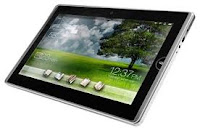 ASUS eee Pad EP101TC 10” inch table running Windows Compact 7 edition. It is interesting see that this is the only modern tablet that is using Windows operation system.
It seems like there will be a very big market as well as a competition for table or Pads in the future. End of the it all depends how these gadgets are really useful in your day today life and how much you can spend on them.

Apple iPad - Most people find it cool and believe that iPads can change their lives style. It is a great tool that if you are too lazy to Carry a laptop but need a bigger screen for presentations, emails, take notes and etc. However it is missing some basic features like camera, phone, USB port (hardware limitations) and Flash player (Software limitation). I am sure Apple will address these area in the future versions of iPads as the competition is going to start soon.

Dell Streak is 5inch screen big phone again with Android 1.6 and people find it interesting. Even 9 inch and 7 inch then this would be a good solution. I found this interesting video about Dell Streak from a guy who use iphone, iphone 3G, iphone 3Gs, iphone 4G and iPad.
RIM Tablet - There are some news out that RIM is planning to release a Tablet with new OS to challenge Apple and Google. It will have a 7inch screen with a new operating system build with QNX Software Systems. Waiting for more information to follow.

You know how to find part 2 of the Demo of Cisco Cius. Don't you?


It seems like there will be a very big market as well as a competition for table or Pads in the future. End of the it all depends how these gadgets are really useful in your day today life and how much you can spend on them.
Jailbreak Amazon Kindle 3
According to MobileRead forum you can jail break the Amazon's latest reading device Kindle 3 to unlock some cool features. Ninety percent of the limitation come from the software side. That is clear as we can see hacks and jailbreaks for each modern devices they release with some crazy limitation.

Kindle 3 Jailbreak and Hack will allow you to add and change some extra fonts, USB Networking and some screen saver hacks.
Following is the list of programs used in this hack.
You can read more about this one mobileRead and try it on your own risk. Personally I will not jailbreak unless I really need to test and use a test environment where I can afford to loose.

Kindle 3 Jailbreak and Hack will allow you to add and change some extra fonts, USB Networking and some screen saver hacks.
Following is the list of programs used in this hack.
clarknova for the first 2.5.x jailbreak & screensavers hacks
porkupan for one of the first bind mount based fonts hack
kukyakya for the usb watchdog & update-safe tweaks
jyavenard for the packager
tedsan & blogkindle for their fonts hack
You can read more about this one mobileRead and try it on your own risk. Personally I will not jailbreak unless I really need to test and use a test environment where I can afford to loose.
Thursday, September 23, 2010
HTC Windows Phone 7 phones next month

Labels:
HTC,
Windows Phone 7
5 Must have Data Recovery Tools
Have you ever thought that some deleted files or corrupted data that is been removed from your hard disk may turn important after some days or weeks? There is an old proverb that says, “Everything that has been loss comes to your need one day or the other”. Well, this proverb definitely suits here as there are people who are surfing internet to find some best data recovery tools online. Data that has been lost or deleted can be easily recovered using some amazing data recovery tools or software. This article will introduce you some best 5 data recovery tools or software for recovering your deleted or corrupted lost files. If you want to Learn about Data Destruction.
Remember the below data recovery tools help to recover your data from the computer hard disk drive, floppy drives, USB flash drives, pen drives or any other removable disks.
1: PC Inspector File Recovery 4.x data recovery software: Many times we lose files from the hard disk drives or removable drives that have a damaged FAT or boot sector. PC Inspector helps in recovering the damaged or deleted files that has no header entry. Files supported by this amazing data recovery tool are FAT12, FAT16, FAT32 & NTFS file schemes.
2: Disk Digger: This is one of the best freeware tools for recovering lost data from any kind of drives that your computer supports or reads. As stated above it includes all kind of flash and USB drives for recovering the lost data files.
3: NTFS Undelete: This is also amazing software developed for recovering the deleted lost data from your computer drives. Your lost files are easily recovered using this software.
4: Undeleted Plus: This recovery tool software is quite famous across the globe and among the software professionals. Your computer hard disk files that are being deleted by mistake is effectively recovered using this software tool. You can surf online and get this software with one click by taking the help of Google search engine.
5: Digital Media Recovery Software: This is one of the most versatile data recovery tools that support Windows XP (200-2003), Windows Vista and Windows 7. The signature search tool of this amazing data recovery software helps in getting or recovering the lost deleted data within a short time.
Some other data recovery tools that are famous for media recoveries are iPod mp3 recovery software, Recuva, EASEUS and Photo recovery (for MAC).
Remember the below data recovery tools help to recover your data from the computer hard disk drive, floppy drives, USB flash drives, pen drives or any other removable disks.
1: PC Inspector File Recovery 4.x data recovery software: Many times we lose files from the hard disk drives or removable drives that have a damaged FAT or boot sector. PC Inspector helps in recovering the damaged or deleted files that has no header entry. Files supported by this amazing data recovery tool are FAT12, FAT16, FAT32 & NTFS file schemes.
2: Disk Digger: This is one of the best freeware tools for recovering lost data from any kind of drives that your computer supports or reads. As stated above it includes all kind of flash and USB drives for recovering the lost data files.
3: NTFS Undelete: This is also amazing software developed for recovering the deleted lost data from your computer drives. Your lost files are easily recovered using this software.
4: Undeleted Plus: This recovery tool software is quite famous across the globe and among the software professionals. Your computer hard disk files that are being deleted by mistake is effectively recovered using this software tool. You can surf online and get this software with one click by taking the help of Google search engine.
5: Digital Media Recovery Software: This is one of the most versatile data recovery tools that support Windows XP (200-2003), Windows Vista and Windows 7. The signature search tool of this amazing data recovery software helps in getting or recovering the lost deleted data within a short time.
Some other data recovery tools that are famous for media recoveries are iPod mp3 recovery software, Recuva, EASEUS and Photo recovery (for MAC).
Labels:
Data Recovery,
tools
Whats Going on with Google
Google has a different approach comparing to most of the other companies. Keep on releasing products one after another. Most of them fail and some end up as killing products. If you like to follow what are the new products they launch this would be a good news.
What Google blog says about their new page dedicated all the new projects they do.
"But if you want to keep up just with what’s new (or even just what Google does besides search), you’ll want to know about Google New. A few of us had a 20 percent project idea: create a single destination called Google New where people could find the latest product and feature launches from Google. It’s designed to pull in just those posts from various blogs. We hope it helps you find something useful you’ve never tried before."
Visit Google New for everything new from Google.
Official Google Blog: One place to find everything new from Google
What Google blog says about their new page dedicated all the new projects they do.
"But if you want to keep up just with what’s new (or even just what Google does besides search), you’ll want to know about Google New. A few of us had a 20 percent project idea: create a single destination called Google New where people could find the latest product and feature launches from Google. It’s designed to pull in just those posts from various blogs. We hope it helps you find something useful you’ve never tried before."
Visit Google New for everything new from Google.
Official Google Blog: One place to find everything new from Google
Wednesday, September 22, 2010
Mouse Over Hack on Twitter Enable Pop ups
Hackers are smarter and group of people who think out of the box to achieve something that a system is not suppose to do. Sometimes it can be useful, but most of the cases it will do a damage to the society. If you have studied the SQL injection, I am sure you have surprised first time, how simple it is and effective and amazing way to by pass a logging screen. This is a similar hack that will allow pop-ups in Twitter.
 Hackers used a security flaw in twitter retweeting malicious code, activating pop-ups, and even exposing users to an unwanted web sites. Within a short time period it was fixed and twitter is now safe.
This is how the Mouse Over Hack started according the the twitter blog.
“Early this morning, a user noticed the security hole and took advantage of it on Twitter.com. First, someone created an account that exploited the issue by turning tweets different colors and causing a pop-up box with text to appear when someone hovered over the link in the Tweet. This is why folks are referring to this an “onMouseOver” flaw -- the exploit occurred when someone moused over a link. “
End of the day twitter fixed it immediately and make it safe for the twitter lovers.
Source: Twitter Blog & FOXNews

This is how the Mouse Over Hack started according the the twitter blog.
“Early this morning, a user noticed the security hole and took advantage of it on Twitter.com. First, someone created an account that exploited the issue by turning tweets different colors and causing a pop-up box with text to appear when someone hovered over the link in the Tweet. This is why folks are referring to this an “onMouseOver” flaw -- the exploit occurred when someone moused over a link. “
End of the day twitter fixed it immediately and make it safe for the twitter lovers.
Source: Twitter Blog & FOXNews
Tuesday, September 21, 2010
Internet Explorer 9 Beta looks Great
What is best Internet browser? What is the most fastest and secure browser? Some of the questions and arguments going around. I am not going to talk about browser war. This is all about the Internet Explorer 9 Beta. Has Microsoft has done a pretty good job this time? Lets find it out.
Download and Installing IE 9 Beta
It was a pretty smooth and fast installation and required to restart the computer as usual. Download and Installation took less than 5 minutes. IE9 is only supporting later version of Windows (Windows 7 and Windows Vista). It dose not support Windows XP. I think it is a good move as Microsoft badly need to move forward with Windows 7.

First Time
It was a pretty quick start and gave options to disable the plugins and add-ons to make it load faster.
IE9 Looks and feel
IE9 looks pretty similar to Google Chrome. Simplified interface provide the maximum space for the website. Compact search and URL to one box with Security view Compatibility view reload page and stop loading buttons. You can customize the search to your favorite search engine. Unlocking the toolbar will give you a option to resize the address bar.
IE 9 Tab Hacks
IE9 given the maximum functionality to its tabs. You can arrange the tabs as you want and you can drag a tab out side, so it will open as new window ( Just like in Google Chrome). Double click on the tool bar will open a new tab for you.

Memory usage
Without any add-ons and plugins memory usage is pretty low comparing to Google Chrome and FireFox. However, it totally depend on the open website and number of tabs. I tried my best of control these factors by opening the same webpage and number of tabs.
Overall Microsoft has done a good job in IE9 in terms of Loading time and look and feel of the web browser and user friendliness. Security level of IE9 is yet to be revealed.
If you are interested and running Windows Vista or 7 download IE 9 and give it a try.
Download and Installing IE 9 Beta
It was a pretty smooth and fast installation and required to restart the computer as usual. Download and Installation took less than 5 minutes. IE9 is only supporting later version of Windows (Windows 7 and Windows Vista). It dose not support Windows XP. I think it is a good move as Microsoft badly need to move forward with Windows 7.

First Time
It was a pretty quick start and gave options to disable the plugins and add-ons to make it load faster.
IE9 Looks and feel
IE9 looks pretty similar to Google Chrome. Simplified interface provide the maximum space for the website. Compact search and URL to one box with Security view Compatibility view reload page and stop loading buttons. You can customize the search to your favorite search engine. Unlocking the toolbar will give you a option to resize the address bar.
IE 9 Tab Hacks
IE9 given the maximum functionality to its tabs. You can arrange the tabs as you want and you can drag a tab out side, so it will open as new window ( Just like in Google Chrome). Double click on the tool bar will open a new tab for you.

Memory usage
Without any add-ons and plugins memory usage is pretty low comparing to Google Chrome and FireFox. However, it totally depend on the open website and number of tabs. I tried my best of control these factors by opening the same webpage and number of tabs.
Overall Microsoft has done a good job in IE9 in terms of Loading time and look and feel of the web browser and user friendliness. Security level of IE9 is yet to be revealed.
If you are interested and running Windows Vista or 7 download IE 9 and give it a try.
Labels:
Hacks,
IE9 Beta,
Web Browser
PSP games on PS3 are REAL
Russian console gamer successfully work around a way to play PSP games on PS3. Yes, this is jailbreaking your PS3. He has already released the video proof.
According to GameSuper it was a really complicated and time consuming process by using tools which are not leaked to public.
"It was very hard 'cause I changed a lot in game files and a lot on PS3 internal HDD to get it work. Unfortanally I can't describe here how to do it manually - it's very long and hard and some components are needed which are not leaked to public, and I'm not gonna leak them either." Says GameSuper.
He is going to release a tool which will to convert EVERY game from PSP ISO to PS3-compatible version automatically. At this stage I am not sure whether it is legal or illegal process. We will be able to see it as soon as he release the jailbreak.
His project will contain of 2 parts:
1). A PC tool in which you specify input PSP ISO and output directory and just press Convert and wait 5-7 mins. After that you get full PS3 compatible game. It can be done with EVERY game.
2). A homebrew PKG for PS3 which needs to be launched only once to make some changes and copy some new files on PS3 internal HDD.
Enjoy his first video Showing GTS: Chinatown Wars launching on PS3.
Source: PSX-Scene.com
According to GameSuper it was a really complicated and time consuming process by using tools which are not leaked to public.
"It was very hard 'cause I changed a lot in game files and a lot on PS3 internal HDD to get it work. Unfortanally I can't describe here how to do it manually - it's very long and hard and some components are needed which are not leaked to public, and I'm not gonna leak them either." Says GameSuper.
He is going to release a tool which will to convert EVERY game from PSP ISO to PS3-compatible version automatically. At this stage I am not sure whether it is legal or illegal process. We will be able to see it as soon as he release the jailbreak.
His project will contain of 2 parts:
1). A PC tool in which you specify input PSP ISO and output directory and just press Convert and wait 5-7 mins. After that you get full PS3 compatible game. It can be done with EVERY game.
2). A homebrew PKG for PS3 which needs to be launched only once to make some changes and copy some new files on PS3 internal HDD.
Enjoy his first video Showing GTS: Chinatown Wars launching on PS3.
Source: PSX-Scene.com
Monday, September 20, 2010
Important accessories to use at the gym
You would have heard that proper nutrition,exercise and supplements to a healthy body...
Here is one additional secret that will enable you do "proper" exercise that is ... using correct accessories. The following i have used and i gurantee you wilk notice the difference once you start using them..
1. hand gloves
2. Wrist strap
3. Wrist wrap
Other accessories i havent used but would definitely like to try are
Shoulder wrap
Knee wrap
Elbow wrap
Know Your PC Configuration
There are many cases that you have to find out the exact configurations of your PC. Most of the time you will not be able to figure them out just by looking at the System Properties. Piriform Speccy, simple light weighted software will give you all the information you would like to know about your computer.

May be you require to buy new hardware to upgrade your computer or replace old parts. Specially if you are buying RAM for your computer it is important to match the RAM Type, Frequency exactly. Sometime you need to find out the hardware information when you try to troubleshoot problems. In my case alway I need to find out the hardware information to download and install drivers after reinstalling Windows. In any of these cases Piriform Speccy will come handy.
It is a piece of software that need to be downloaded and installed (fairly simple) and run to find out all the hardware and operating system information you required.
It can give your the

May be you require to buy new hardware to upgrade your computer or replace old parts. Specially if you are buying RAM for your computer it is important to match the RAM Type, Frequency exactly. Sometime you need to find out the hardware information when you try to troubleshoot problems. In my case alway I need to find out the hardware information to download and install drivers after reinstalling Windows. In any of these cases Piriform Speccy will come handy.
It is a piece of software that need to be downloaded and installed (fairly simple) and run to find out all the hardware and operating system information you required.
It can give your the
- Serial number and exact version of your operating system.
- CPU details
- RAM
- Motherboard
- Graphic Card
- Hard Drive
- Optical Drives
- Audio Drivers
- Peripherals like mouse key board
- Network Card.
Friday, September 17, 2010
Gmail Video chat enhancements
Google news for all of you who use Gmail video chat. Cool New lab feature will help you to preview video features before it is on for everyone. Visit Gmal Labs tab under setting and turn on the "Video chat enhancements". You will see a higher resolution and bigger video chat Window.
Wednesday, September 15, 2010
Hack ASP.NET Form Authentication in 30 minute
A bug in the default encryption used to protect the cookies used to hack forms in ASP.NET forms. Security researches Thai Duong and Juliano Rizzo claim that process is hundred percent reliable and it only takes 30 to 50 minutes by using Padding Oracle Exploit Tool (POET). As a webmaster it is important to take immediate action to secure your ASP.NET website been hacked. Directly quoting from visual studio magazine following changes to the web.config file will fix the exploit instantly.
The encryption method can be set in the web.config file for a site, in IIS 7 for a Web server, or in the config file for .NET on a server in %SYSTEMROOT%\Microsoft.NET\Framework\version\CONFIG\. On 64-bit systems, it must also be set in %SYSTEMROOT%\Microsoft.NET\Framework64\version\CONFIG\. A typical entry would look like this:
Reference and to read more from Security Hack Exposes Forms Authentication in ASP.NET [Visual Studio Magazine]
The encryption method can be set in the web.config file for a site, in IIS 7 for a Web server, or in the config file for .NET on a server in %SYSTEMROOT%\Microsoft.NET\Framework\version\CONFIG\. On 64-bit systems, it must also be set in %SYSTEMROOT%\Microsoft.NET\Framework64\version\CONFIG\. A typical entry would look like this:
<machinekey decryption="3DES" decryptionkey="AutoGenerate,IsolateApps" validation="3DES" validationkey="AutoGenerate,IsolateApps">On a Web farm, this setting will have to be made on all the servers in the farm.
Reference and to read more from Security Hack Exposes Forms Authentication in ASP.NET [Visual Studio Magazine]
Tuesday, September 14, 2010
5 Simple data recovery tools
Professional data recovery bill can be huge and normally you will get charge per mega byte. If you have the correct set of tools it is much easier process. I will consider data recovery as an advanced topic as it requires you to master trouble shooting skills and a better understanding of how data storage media works with a operating system.

Recover deleted files
Simplest and most common data recovery scenario. Lets look at some simple and free tools that can be used.
STOP! As soon as you noticed that important file is been deleted stop working with that computer ( Copy, Cut, paste files or restarting computer). However, you have to take a risk to download your file un-delete tool and install it. Use another computer to download the files, copy it to flash drive and install in the affected computer to minimize the risk.
WARNING! If you do not want to spend money to buy a full version, don’t install the trial versions. 99% Recovery software trial version require you to purchase the software to recover files.
1. Recuva is a effective tool to bring back deleted files. Make sure you run a deep scan (Options) to recover all the possible files. It is worth to run the Deep Scan even though it takes some time. [Download Recuva]
2. Pandora File Recovery is another handy tool. It make sure you check the Recycle bin before you run the lengthy recovering process. Then it gives you three options to either browse, search or deep surface scan. Deep surface scan method will effectively recover drivers with corrupted file tables, recently formatted hard disk, memory sticks, jump drives, memory cards, CD’s and DVDs. [Download Pandora File Recovery]
Recuva Vs Pandora File Recovery - There are different strong points for each software and personally I keep both in my portable hard drive.
3. If you are looking for a paid option I would highly recommend R-Studio file recovery software. As R-Studio introduction it recover files from
[Buy R-Studio]
Recover Files when your computer crashed
If you were too lazy to back up your files and now cannot boot up your computer (Only if your computer start up but your OS is crashed and cannot access any of files try the following data recovery solutions.
4 . Slax - Your Pocket operating system will boot up your computer from the CD ROM and give you full access to copy all your files to a external hard drive (How to mount NTFS hard drive). Linux based live CD which is already loaded with essential recovery tools and collection of pre installed software is a effective way to get back all your important files from your crashed computer. It even manage to recover files when file table was corrupted.
[Download Slax]
5. UBCD4Win - Ultimate Boot CD for Windows is a Windows XP Live CD if you really need a windows environment. You require a Windows XP SP1 or SP2 (Prefer SP2) CD to create this live CD. It comes with collection of file recovery and Windows Administration tools that can be used to recover your computer.
[Download Ultimate Boot CD for Windows]
Slax Vs UBCD4Win - I prefer Slax as it is faster and easier to use comparing to UBCD4Win. However, I don't forget to carry both live CDs in my CD pack.
Forensics Data Recovery
Forensic Data Recovery is challenging and require set of skills and procedures. You need to master then over the time with different conditions. Most challenging part is that under any condition or reason you cannot change the original data (data source). Always you require to use special Forensic data recovery Live CDs.
6. Helix - e-fense - Cyber Security was one of my favorite forensics live CDs used to grab hard drive image and recover files. However, it is no longer available for free. [Try Helix]
These are not the only available data recovery tools but list of simple and easy to use data recovery tools you can try in various situations. Feel free to share your best data recovery tool you have used...
Recover deleted files
Simplest and most common data recovery scenario. Lets look at some simple and free tools that can be used.
STOP! As soon as you noticed that important file is been deleted stop working with that computer ( Copy, Cut, paste files or restarting computer). However, you have to take a risk to download your file un-delete tool and install it. Use another computer to download the files, copy it to flash drive and install in the affected computer to minimize the risk.
WARNING! If you do not want to spend money to buy a full version, don’t install the trial versions. 99% Recovery software trial version require you to purchase the software to recover files.
1. Recuva is a effective tool to bring back deleted files. Make sure you run a deep scan (Options) to recover all the possible files. It is worth to run the Deep Scan even though it takes some time. [Download Recuva]
2. Pandora File Recovery is another handy tool. It make sure you check the Recycle bin before you run the lengthy recovering process.
Then it gives you three options to either browse, search or deep surface scan. Deep surface scan method will effectively recover drivers with corrupted file tables, recently formatted hard disk, memory sticks, jump drives, memory cards, CD’s and DVDs. [Download Pandora File Recovery]Recuva Vs Pandora File Recovery - There are different strong points for each software and personally I keep both in my portable hard drive.
3. If you are looking for a paid option I would highly recommend R-Studio file recovery software. As R-Studio introduction it recover files from
- FAT12/16/32/exFAT, NTFS, NTFS5 (Windows 2000 /XP /2003 /Vista /2008 /Win7)
- HFS/HFS+ (Macintosh)
- Little and Big Endian variants of UFS1/UFS2 (FreeBSD/OpenBSD/NetBSD/Solaris) Ext2/Ext3/Ext4 FS (Linux) partitions.
- local and network disks, even if such partitions are formatted, damaged or deleted.
[Buy R-Studio]
Recover Files when your computer crashed
If you were too lazy to back up your files and now cannot boot up your computer (Only if your computer start up but your OS is crashed and cannot access any of files try the following data recovery solutions.
4 . Slax - Your Pocket operating system will boot up your computer from the CD ROM and give you full access to copy all your files to a external hard drive (How to mount NTFS hard drive). Linux based live CD which is already loaded with essential recovery tools and collection of pre installed software is a effective way to get back all your important files from your crashed computer. It even manage to recover files when file table was corrupted.
[Download Slax]
5. UBCD4Win - Ultimate Boot CD for Windows is a Windows XP Live CD if you really need a windows environment. You require a Windows XP
SP1 or SP2 (Prefer SP2) CD to create this live CD. It comes with collection of file recovery and Windows Administration tools that can be used to recover your computer. [Download Ultimate Boot CD for Windows]
Slax Vs UBCD4Win - I prefer Slax as it is faster and easier to use comparing to UBCD4Win. However, I don't forget to carry both live CDs in my CD pack.
Forensics Data Recovery
Forensic Data Recovery
is challenging and require set of skills and procedures. You need to master then over the time with different conditions. Most challenging part is that under any condition or reason you cannot change the original data (data source). Always you require to use special Forensic data recovery Live CDs. 6. Helix - e-fense - Cyber Security was one of my favorite forensics live CDs used to grab hard drive image and recover files. However, it is no longer available for free. [Try Helix]
These are not the only available data recovery tools but list of simple and easy to use data recovery tools you can try in various situations. Feel free to share your best data recovery tool you have used...
Labels:
Data Recovery,
Hacks
Friday, September 10, 2010
5 tips for using Priority Inbox
Gmail has recently introduce the priority inbox where you can have a separate inbox only for VIP emails. Here are 5 ways to make the maximum out of it. You will able to save lot of time you waste to read all the email.
1. Customize your selection
By default, Priority Inbox has three sections: "Important and Unread," "Starred" and "Everything Else.” But that doesn't mean you have to leave them that way. You can make a section show messages from a particular label (like your “Action” or “To-do” label), add a fourth section, or change the maximum size of any section. Visit the Priority Inbox tab under Settings to customize your sections, or do it right from the inline menus.
2. Train the system
If Gmail makes a mistake, you can help it learn to better categorize your messages. Select the misclassified message, then use the importance buttons at the top of your inbox to correctly mark it as important or not important.
3. See the best of your filtered messages
You can set up Priority Inbox to show you not just the best of your inbox, but also the best of messages you filter out of your inbox and might otherwise miss. Just change your Priority Inbox settings to “Override filters” and Gmail will surface any important messages that would otherwise skip your inbox.
4. Use filters to guarantee certain messages get marked important (or not)
If you read and reply to a lot of messages from your mom, Gmail should automatically put incoming messages from her in the “Important and unread” section. But if you want to be 100% sure that all messages from your mom (or your boss, boyfriend, client, landlord, etc.) are marked important, you can create a filter for messages from that sender and select “Always mark as important.” Similarly, if you regularly read messages from your favorite magazine, they should automatically get marked as important. If you’d rather they end up in the “Everything else” section, you can create a filter to never mark them as important.
5. Archive unimportant messages quickly
One of the features that can help make you more efficient is the ability to archive all of the visible messages in the "Everything Else" section at once. Just click on the down arrow next to "Everything Else" and select the "Archive all visible items" option. If you want to be able to archive even more messages at once, you can increase the maximum number of messages that show in that section from the same drop-down.
5 tips for using Priority Inbox - Official Gmail Blog
1. Customize your selection
By default, Priority Inbox has three sections: "Important and Unread," "Starred" and "Everything Else.” But that doesn't mean you have to leave them that way. You can make a section show messages from a particular label (like your “Action” or “To-do” label), add a fourth section, or change the maximum size of any section. Visit the Priority Inbox tab under Settings to customize your sections, or do it right from the inline menus.
2. Train the system
If Gmail makes a mistake, you can help it learn to better categorize your messages. Select the misclassified message, then use the importance buttons at the top of your inbox to correctly mark it as important or not important.
3. See the best of your filtered messages
You can set up Priority Inbox to show you not just the best of your inbox, but also the best of messages you filter out of your inbox and might otherwise miss. Just change your Priority Inbox settings to “Override filters” and Gmail will surface any important messages that would otherwise skip your inbox.
4. Use filters to guarantee certain messages get marked important (or not)
If you read and reply to a lot of messages from your mom, Gmail should automatically put incoming messages from her in the “Important and unread” section. But if you want to be 100% sure that all messages from your mom (or your boss, boyfriend, client, landlord, etc.) are marked important, you can create a filter for messages from that sender and select “Always mark as important.” Similarly, if you regularly read messages from your favorite magazine, they should automatically get marked as important. If you’d rather they end up in the “Everything else” section, you can create a filter to never mark them as important.
5. Archive unimportant messages quickly
One of the features that can help make you more efficient is the ability to archive all of the visible messages in the "Everything Else" section at once. Just click on the down arrow next to "Everything Else" and select the "Archive all visible items" option. If you want to be able to archive even more messages at once, you can increase the maximum number of messages that show in that section from the same drop-down.
5 tips for using Priority Inbox - Official Gmail Blog
Thursday, September 9, 2010
Use Google to learn alternative products
Are we fully unitized Google to learn things? Most probably the answer is YES. Because every time you come a cross something that we are not familiar with, you Google it. Are we using Google to to learn things that we haven't heard before? May be not. As we don’t know what to search. In this post I will show a trick that will help you to come up with something you don't know from what you already know.
Specially if you are looking for some alternative products or services this method will come handy. For example I will take one of my favorite free software that I use to clean up my computer and make it run faster; CCleaner. I would like to know what else I can use.
Simple go to Google and type “CClearner Vs ”. Remember the trick to add “Vs “ to bring up the alternative suggestions from Google. I did not had to go through blog posts, articles or forums to find out ten different alternative product to CCleaner. Here is some of the products I found : cleanup, glary utilities, tuneup, ncleaner.
You can try it for any other product or service that you can think of. Some examples I tried.
 Is Apple the only alternative solution for Microsfot? Microsoft Vs
I do not like iPhone need something else? iPhone Vs
What are the other Search engines out there? Google Vs
This can apply to anything you can think of and see what Google is suggesting for you. If you come cross some interesting findings do not forget share it with us.
Specially if you are looking for some alternative products or services this method will come handy. For example I will take one of my favorite free software that I use to clean up my computer and make it run faster; CCleaner. I would like to know what else I can use.
Simple go to Google and type “CClearner Vs ”. Remember the trick to add “Vs “ to bring up the alternative suggestions from Google. I did not had to go through blog posts, articles or forums to find out ten different alternative product to CCleaner. Here is some of the products I found : cleanup, glary utilities, tuneup, ncleaner.
You can try it for any other product or service that you can think of. Some examples I tried.

I do not like iPhone need something else? iPhone Vs
What are the other Search engines out there? Google Vs
This can apply to anything you can think of and see what Google is suggesting for you. If you come cross some interesting findings do not forget share it with us.
Google Search: now faster than the speed of type
As the title explain Google has gone to the next level of search simply by adding a real time search result as you type. May be they have learn something from the Google wave. Google instant search is smart enough not to search incomplete words but give the result for the most likely words.
Here is some of the core features of Google Instant, mentioned on their blog.
Dynamic Results - Google dynamically displays relevant search results as you type so you can quickly interact and click through to the web content you need.
Predictions - One of the key technologies in Google Instant is that we predict the rest of your query (in light gray text) before you finish typing. See what you need? Stop typing, look down and find what you’re looking for.
Scroll to search - Scroll through predictions and see results instantly for each as you arrow down.
Check whether you are luck to experience Google Instant as it is rolling out over several days to users signed to Google accounts
Biggest questions is is there any advantage of getting the search results as you type? To answer this we really have to use it some some times and see how it support our daily life in front of the computer. Technology wise Google wave was a super idea but humans always have limitation. Try Google Instant and see how you go with it....
Official Google Blog: Search: now faster than the speed of type
Here is some of the core features of Google Instant, mentioned on their blog.
Dynamic Results - Google dynamically displays relevant search results as you type so you can quickly interact and click through to the web content you need.
Predictions - One of the key technologies in Google Instant is that we predict the rest of your query (in light gray text) before you finish typing. See what you need? Stop typing, look down and find what you’re looking for.
Scroll to search - Scroll through predictions and see results instantly for each as you arrow down.
Check whether you are luck to experience Google Instant as it is rolling out over several days to users signed to Google accounts
Biggest questions is is there any advantage of getting the search results as you type? To answer this we really have to use it some some times and see how it support our daily life in front of the computer. Technology wise Google wave was a super idea but humans always have limitation. Try Google Instant and see how you go with it....
Official Google Blog: Search: now faster than the speed of type
Labels:
Google,
Search Engine
Wednesday, September 8, 2010
Computer Troubleshooting Secrets Revealed
You might be trouble shooting the computers from time to time to over come the challenges and make things work as it is. I have been doing this for over 10 years and every day I find it quite challenging and fun. Solving a problem will make you happy and bit prouder and it all depend on how challenging it is. If you enjoy challenges and trouble shooting or even you hate it but have no choice, you will find this post useful.
It can be a error message, data loss, Internet connection loss or dose not connect, pragmatical error or it can be any sort of issue or problem you need to know only one generic method to solve it. Knowing this system will make your trouble shooting life easy.
First step is knowing there is a problem in your system. It is obvious that if there is a error message or things are not working as they suppose to be mean there is a problem in your system.
Secondly you need to identify the problem. This need good observation skills. If there is a problem you need to know more details about the it in order to figure out a solution. This is a straight forward process. Simply by looking at the error message or observe the way system react for a input or a change of state will give you a good idea about the issue. In cases, error message nor system behaviour may not reflect the real problem. Your experience and your trouble shooting skills will come handy.
You can argue that the first and second step are the same. In real trouble shooting scenarios you will not notice big difference between these two step as you switch between these steps really fast.
However, skipping the second step is a common mistake we do most of the time. Specially if you do not have any computer back ground you tend to think that fixing a computer problem is hard as making a space craft. 60% of the computer problems do not require special skills. Even if you call for professional help, identifying the problem will give you a good advantage explaining the issue to someone and get help.
How many times you were disappointed after calling a support line. I am not pointing the finger at you only but if you can explain the problem well to the persona who is in the other end it is always easy to get a better solution. For example, “My computer is not starting”, “My computer is slow”, “I cannot go to mywebsite.com” or similar statements dose not make much sense. If you have asked couple of questions from yourself, in most cases you might able to solve these problems by your self. Worst case you can explain it clearly. In case your computer is not starting in computer language “not booting”, here is the couple of general questions you can ask.
Dose the power is on to the computer? Dose the power light of the computer is on?
Is your monitor is on? Monitor power light is on?
What is the last screen you see on the monitor? Is it completely black?
Is there a blinking line appears on your screen?
Dose it come to the Windows logo screen and stop working?
Dose it come to the log in screen and stop from there?
You do not require any computer knowledge to get answers to any of these questions. Do you? It is just general knowledge, Now you will realise how much more you know about your computer and the current problem.
Find the possible solutions for your problem is the third step. Information you gathered from the second step will come handy here. It is really hard to find a solution with out knowing the problem. Now you know the problem and need to know techniques to find the solutions.
Before I come to the techniques I would like to let you know couple of secrets.
* You are not the first one to experience this problem
* Don’t panic, patience is the key to solve problems
Google is the best place to look for the solutions to your computer and Internet issues. There are so many resources out there giving you step by step tutorial to solve problems or get something done correctly.
Another great place to look for how to fix solution is YouTube. Not only images and instructions, you can see how someone is fixing a it. What else you required.
As you identify the problem in step two, now try describe it in couple of words.For example “Computer stop booting from windows logo screen”. You can try this in google and check out the results you get. Key here is to give couple of good words that describe the issue. If you are getting a error message best way to search is to type the exact error message. You will be surprised the number of solutions given for a single problem. That is because you are not the first or only person to experience it. In any case you find something that no one else has experienced make sure to put it as a blog post. Will go one step back word. Try search you first explanation of your problem, in my case “computer dose not start”. You end up with lot of possibilities which you don't want to go through. This is the best way to become a Google ninja. Be more specific and describe it with couple of keywords.
There are lot of possible solutions in front of you. However, I will not apply any of them still or try to fix things up randomly. Because, it can create more issues. For example if my computer is not booting up and if I factory set the computer or reinstall Windows in first place I will loose all my data. Even though I may have fixed one problem it created a worst problem. Now I have to spend time and money to recover my data.
Here we come to the final step where you apply the solution you found. You required to go through the solutions carefully and first check how comfortable are you applying it to computer. I suggest this is the best place you should decide whether to get some professional help or not. Even if you go for professional help you will able to fix the problem easily as you know the situation very well and also you know the possible solutions as well.
If you have a computer background or you like to learn more about computers you should not afraid to take a risk. Saying that you should always know your worst case scenario and the limitations. I would not experiment thing on my work computer or someone else computer where I cannot afford to loose anything.
However, if it is a simple solution that really dose not have a risk I will definitely try it out knowing what exactly I am doing.
In this way you can easily trouble shoot your computer. I am sure you can apply thins on your day to day life as well. Give it a try and I would like to hear your story as well. Share it with me.
It can be a error message, data loss, Internet connection loss or dose not connect, pragmatical error or it can be any sort of issue or problem you need to know only one generic method to solve it. Knowing this system will make your trouble shooting life easy.
First step is knowing there is a problem in your system. It is obvious that if there is a error message or things are not working as they suppose to be mean there is a problem in your system.
Secondly you need to identify the problem. This need good observation skills. If there is a problem you need to know more details about the it in order to figure out a solution. This is a straight forward process. Simply by looking at the error message or observe the way system react for a input or a change of state will give you a good idea about the issue. In cases, error message nor system behaviour may not reflect the real problem. Your experience and your trouble shooting skills will come handy.
You can argue that the first and second step are the same. In real trouble shooting scenarios you will not notice big difference between these two step as you switch between these steps really fast.
However, skipping the second step is a common mistake we do most of the time. Specially if you do not have any computer back ground you tend to think that fixing a computer problem is hard as making a space craft. 60% of the computer problems do not require special skills. Even if you call for professional help, identifying the problem will give you a good advantage explaining the issue to someone and get help.
How many times you were disappointed after calling a support line. I am not pointing the finger at you only but if you can explain the problem well to the persona who is in the other end it is always easy to get a better solution. For example, “My computer is not starting”, “My computer is slow”, “I cannot go to mywebsite.com” or similar statements dose not make much sense. If you have asked couple of questions from yourself, in most cases you might able to solve these problems by your self. Worst case you can explain it clearly. In case your computer is not starting in computer language “not booting”, here is the couple of general questions you can ask.
Dose the power is on to the computer? Dose the power light of the computer is on?
Is your monitor is on? Monitor power light is on?
What is the last screen you see on the monitor? Is it completely black?
Is there a blinking line appears on your screen?
Dose it come to the Windows logo screen and stop working?
Dose it come to the log in screen and stop from there?
You do not require any computer knowledge to get answers to any of these questions. Do you? It is just general knowledge, Now you will realise how much more you know about your computer and the current problem.
Find the possible solutions for your problem is the third step. Information you gathered from the second step will come handy here. It is really hard to find a solution with out knowing the problem. Now you know the problem and need to know techniques to find the solutions.
Before I come to the techniques I would like to let you know couple of secrets.
* You are not the first one to experience this problem
* Don’t panic, patience is the key to solve problems
Google is the best place to look for the solutions to your computer and Internet issues. There are so many resources out there giving you step by step tutorial to solve problems or get something done correctly.
Another great place to look for how to fix solution is YouTube. Not only images and instructions, you can see how someone is fixing a it. What else you required.
As you identify the problem in step two, now try describe it in couple of words.For example “Computer stop booting from windows logo screen”. You can try this in google and check out the results you get. Key here is to give couple of good words that describe the issue. If you are getting a error message best way to search is to type the exact error message. You will be surprised the number of solutions given for a single problem. That is because you are not the first or only person to experience it. In any case you find something that no one else has experienced make sure to put it as a blog post. Will go one step back word. Try search you first explanation of your problem, in my case “computer dose not start”. You end up with lot of possibilities which you don't want to go through. This is the best way to become a Google ninja. Be more specific and describe it with couple of keywords.
There are lot of possible solutions in front of you. However, I will not apply any of them still or try to fix things up randomly. Because, it can create more issues. For example if my computer is not booting up and if I factory set the computer or reinstall Windows in first place I will loose all my data. Even though I may have fixed one problem it created a worst problem. Now I have to spend time and money to recover my data.
Here we come to the final step where you apply the solution you found. You required to go through the solutions carefully and first check how comfortable are you applying it to computer. I suggest this is the best place you should decide whether to get some professional help or not. Even if you go for professional help you will able to fix the problem easily as you know the situation very well and also you know the possible solutions as well.
If you have a computer background or you like to learn more about computers you should not afraid to take a risk. Saying that you should always know your worst case scenario and the limitations. I would not experiment thing on my work computer or someone else computer where I cannot afford to loose anything.
However, if it is a simple solution that really dose not have a risk I will definitely try it out knowing what exactly I am doing.
In this way you can easily trouble shoot your computer. I am sure you can apply thins on your day to day life as well. Give it a try and I would like to hear your story as well. Share it with me.
Labels:
Computer,
Hacks,
Trouble Shoot
Sunday, September 5, 2010
Will Computer Age Really End on 2012?
Day by day planet earth and its species including humans getting closer to day 20th of December 2012. Mayan long calendar ends on the exact day. Mayans is not the only prehistoric civilisation that predict this day. Egyptian, Hopi, India, Aborigines civilisation and individual Nostradamus are trying to tell something about exact day. As we already lost most of these ancient languages and other documents are just drawings we always end up with questions not answers. Therefore, some predict world is going to end, another group predict that is just the end of present civilisation and others argue that nothing is going to happen in 2012.
What is really going to happen in year 2012? Are we already seeing the changes? This video, presentation at the 2012 Conference by Graham Hancock will answer most of your questions.
Many interesting facts were revealed in his video. Our world is keep on changing its shape time to time. It happened and it will happen in future. We cannot stop that or change it. Our technology hacks tricks will not be enough. Every culture has the same story but in different format. Is that mean something common happened all over the world during the same time period.
Another important thing he mentioned in his presentation [1:05:44] is the book Hamlet's Mill (first published by Gambit, Boston, 1969) by Giorgio de Santillana and Hertha von Dechend. It is amazing how all the sacred places on earth is linked with the same series of numbers coming up again and again. 72 is the hurt beat of the circle and you will be amazed how Mysterious Egyptian Pyramids, Temples around the world is base on number 72. Not only that all the myths and stories use the same numbers. Is it a coincident?
Graham Hancock point out another important fact about our present life style. We are after day to day problems and solving them and out lives are base on nothing but money. Without even knowing we live a life that is not connect with earth. I think it is time to change and think out of the box to have better life.
Related Readings


What is really going to happen in year 2012? Are we already seeing the changes? This video, presentation at the 2012 Conference by Graham Hancock will answer most of your questions.
Many interesting facts were revealed in his video. Our world is keep on changing its shape time to time. It happened and it will happen in future. We cannot stop that or change it. Our technology hacks tricks will not be enough. Every culture has the same story but in different format. Is that mean something common happened all over the world during the same time period.
Another important thing he mentioned in his presentation [1:05:44] is the book Hamlet's Mill
(first published by Gambit, Boston, 1969) by Giorgio de Santillana and Hertha von Dechend. It is amazing how all the sacred places on earth is linked with the same series of numbers coming up again and again. 72 is the hurt beat of the circle and you will be amazed how Mysterious Egyptian Pyramids, Temples around the world is base on number 72. Not only that all the myths and stories use the same numbers. Is it a coincident? Graham Hancock point out another important fact about our present life style. We are after day to day problems and solving them and out lives are base on nothing but money. Without even knowing we live a life that is not connect with earth. I think it is time to change and think out of the box to have better life.
Related Readings
Friday, September 3, 2010
Back to the future: two years of Google Chrome
Happy 2nd Birth Day Google Chrome. It's been a exciting 2 years and Google chrome manage to keep a simple fast and secure environment for web browsing. There is always really cool features and without loosing the simplicity.
Google release a new version to celebrate the birth day. This is what Google say about it.
"Today, we’re releasing a new stable version of Chrome that is even faster and more streamlined. Chrome is now three times faster than it was two years ago on JavaScript performance. We’ve also been working on simplifying the “chrome” of Chrome. As you can see, we took the already minimalist user interface and stripped it down a bit more to make it easier to use. We combined Chrome’s two menus into one, revisited the location of the buttons, cleaned up the treatment of the URL and the Omnibox, and adjusted the color scheme of the browser to be easier on the eyes."
Good luck!!!
Wednesday, September 1, 2010
Email overload? Try Priority Inbox Great way to save time
Are you lost with hundreds and thousands of emails per day? Priority inbox is a better easier solution from the Gmail team.
After lots of internal testing here at Google, as well as with Gmail and Google Apps users at home and at work, we’re ready for more people to try it out. Priority Inbox will be rolling out to all Gmail users, including those of you who use Google Apps, over the next week or so. Once you see the "New! Priority Inbox" link in the top right corner of your Gmail account (or the new Priority Inbox tab in Gmail Settings), take a look.
Email overload? Try Priority Inbox - Official Gmail Blog
After lots of internal testing here at Google, as well as with Gmail and Google Apps users at home and at work, we’re ready for more people to try it out. Priority Inbox will be rolling out to all Gmail users, including those of you who use Google Apps, over the next week or so. Once you see the "New! Priority Inbox" link in the top right corner of your Gmail account (or the new Priority Inbox tab in Gmail Settings), take a look.
Email overload? Try Priority Inbox - Official Gmail Blog
Subscribe to:
Posts (Atom)
