If someone asks me, why I use Google Chrome? Because it is simple, fast and saves time in many ways. Switching to GMail tab and look whether I received a new interesting email is time consuming. It is good excuse to go through old emails as well. With the new GMail extension, your life becomes much easier.
After you install the GMail extension, you will notice a familiar envelop icon in the top bar. That small icon will show you how many new emails are there in your inbox. Now there is no need to switch to GMail tab all the time.
One thing I have notice is it dose not work in the incognito window as the Chrome extensions are disabled from there.
Official Gmail Blog: Gmail Chrome extensions

Showing posts with label Google Chrome. Show all posts
Showing posts with label Google Chrome. Show all posts
Tuesday, February 2, 2010
Wednesday, December 9, 2009
Google Chrome's Pin Tab Feature
If you are use Google Chrome then this feature might be somewhat useful to Pin A tab so it occupies very little space in the tab bar. I personally find it useful - For Firefox users there is a Plugin out there which achieves similar effect.
In chrome, right click on the tab and click on Pin Tab. No plugin required on chrome for this feature

Labels:
chrome,
FireFox,
Google Chrome

Tuesday, November 3, 2009
Google Chrome 4.0 - Introducing Extensions
It is crazy the changes that Google is introducing in Google Chrome 4.0 build. Still it is not available public-ally or beta but only for developers. Basically they are adding more problems, I mean more features to Google Chrome that you have been waiting for years.
In this early Access Release Google Chrome introduce browser extensions.
What is an Extension?
" Extensions are small software programs that can modify and enhance the functionality of Google Chrome "
What can you do with extensions?
Toolstrips - Display small toolbars in Google Chrome's chrome
Page actions - Add buttons to the Omnibox that get displayed for specific pages
Content scripts - Modify the look and behavior of web pages
Before you start with Google Chrome Extensions you need to upgrade your Google chrome to Google Chrome 4.0 developer version. Backup your user profile is recommended as this is not even gone to Beta version.
To Download Google Chrome 4.0: Go to Early Access Release Channels at Chromium Developer Documentation. Backup your data and download and install the Dev channel.
You can restart the browser and check the version in About Google Chrome. You should see something similar. Google Chrome 4.0.233.11

Now you need to learn about extension. It is quite simple as creating a HTML page. Google Chrome Extensions: Developer Documentation will explain you A-Z. Start building Chrome Extensions for your blog web service and you can do lot more.
And if you just want to try Google Chrome Extension this GooglechromeExtensions is a good place to start.
So share your Google Extension experience with us.
In this early Access Release Google Chrome introduce browser extensions.
What is an Extension?
" Extensions are small software programs that can modify and enhance the functionality of Google Chrome "
What can you do with extensions?
Toolstrips - Display small toolbars in Google Chrome's chrome
Page actions - Add buttons to the Omnibox that get displayed for specific pages
Content scripts - Modify the look and behavior of web pages
Before you start with Google Chrome Extensions you need to upgrade your Google chrome to Google Chrome 4.0 developer version. Backup your user profile is recommended as this is not even gone to Beta version.
To Download Google Chrome 4.0: Go to Early Access Release Channels at Chromium Developer Documentation. Backup your data and download and install the Dev channel.
You can restart the browser and check the version in About Google Chrome. You should see something similar. Google Chrome 4.0.233.11

Now you need to learn about extension. It is quite simple as creating a HTML page. Google Chrome Extensions: Developer Documentation will explain you A-Z. Start building Chrome Extensions for your blog web service and you can do lot more.
And if you just want to try Google Chrome Extension this GooglechromeExtensions is a good place to start.
So share your Google Extension experience with us.
Labels:
Extensions,
Google Chrome
Friday, October 2, 2009
How Google Chrome Browser Close to its Operating System
Google has announced its own Operating System to fill the gap between the Internet oriented operating system and classical old school operating system. There are so many features that has been introduced in Google Chrome browser recently gives a good indication that how Google Chrome OS is going to looks like.
There are couple of features that really need to be considered here. At the movement there is not clear indication of how Google OS is going to looks like or support. However, Android (Google OS for its mobile) or the Google Chrome did not make much progress in the present market. In such a condition deciding to go for its own operating system can be though decision. It should be able to replace the current system. At least it should have the functions that we are enjoying or suffering or more the better.
So thing we can learn from Google Chrome browser is that Google is not paying much attention to the current trend. Google strongly believe that it need to break the current limitations or set of barriers to go for a efficient interaction with the Internet application or web. For example when all the browsers are supporting or start supporting plug-ins and tool bars Google Chrome took a strict decision not to support any browser plug-in or tool bars ( Not even their own Google Tool Bar).
 (Image from www.mashable.com) Google Chrome OS Screenshots?
Introducing Google Chrome is not enough to enjoy a speedy and secure life with internet. Reason behind this is that OS that Chrome Browser runs is not supporting it or its capabilities 100%. There are so many factors that slow down the browser or challenge its security.
I will not be surprise to see that so many OS functionalities that we think that we think that we cannot live without will not be supported by Chrome OS. Which will allow us to think better ways to get it done without challenging the simplicity or the security or the reliability of the OS. Bookmarklets are simple example of how well replace the Browser Plugins, tool bars or Add-ons.
Chrome it self supporting couple of features that are close to a OS. I mean just the look and feel and accessing what you need.
Gives one click access to most frequently visited websites. What is the point of having stat menu, task bar and desktop? Why not only desktop where it will automatically arrange its positions base on how frequently you use the application. Recently Google Chrome browser added the flexibility to move/remove or change the view. This can be something you can see on its OS.
Will that be a online Operating System? The idea we have today is to open up browser and go to the website that will let you log into a area that that will allow you to experience a similar desktop that you are experiencing now. There are couple of services like that(www.ajaxwindows.com). However there is not much need on such a system as it only give facility to access and work one virtual desktop. It will always suffer from the slow internet connection, increasing security threats (addition of both online OS and your current OS). Google chrome has different set of challenges that it need to focus on. Provide a faster secure and reliable internet connect with the same set of hardware infrastructure. Google Has its own set of online applications (Google Docs, GMail and etc)to support you and they will get more valuable.
Is Google Chrome OS is the one that connects everything together? One of the most debatable question that raise about Google is that why are they trying so many applications? Why Google want to move it to mobile industry when there are so many existing big player? Again why they want to move to operating system? Will come to these question later.
Google search engine was out there for sometimes for free. No advertising on the home page. There were couple of big players already in the search engine business that were doing great and making money out of it. That is not sound like a good business model. Directly you cannot see any potential of making money out of it. However, later it was wisely used for advertising and the ways of making money is endless.
Answering the above questions that we skipped: One product it self may not sounds exciting or making any profit. But combining couple of such products in smart way may provide much better result. Google Chrome OS will combine all its application browsers and services together.
Secret of Google is it always checks its user base before introducing its next step. By releasing Google Chrome browser they know 30 million people like their idea of simplicity and looking for better way to access internet. Also waiting for a change.
To see what is really going to happen with Google and its new OS we have to wait until second quarter of next year.
There are couple of features that really need to be considered here. At the movement there is not clear indication of how Google OS is going to looks like or support. However, Android (Google OS for its mobile) or the Google Chrome did not make much progress in the present market. In such a condition deciding to go for its own operating system can be though decision. It should be able to replace the current system. At least it should have the functions that we are enjoying or suffering or more the better.
So thing we can learn from Google Chrome browser is that Google is not paying much attention to the current trend. Google strongly believe that it need to break the current limitations or set of barriers to go for a efficient interaction with the Internet application or web. For example when all the browsers are supporting or start supporting plug-ins and tool bars Google Chrome took a strict decision not to support any browser plug-in or tool bars ( Not even their own Google Tool Bar).
(Image from www.mashable.com) Google Chrome OS Screenshots? Introducing Google Chrome is not enough to enjoy a speedy and secure life with internet. Reason behind this is that OS that Chrome Browser runs is not supporting it or its capabilities 100%. There are so many factors that slow down the browser or challenge its security.
I will not be surprise to see that so many OS functionalities that we think that we think that we cannot live without will not be supported by Chrome OS. Which will allow us to think better ways to get it done without challenging the simplicity or the security or the reliability of the OS. Bookmarklets are simple example of how well replace the Browser Plugins, tool bars or Add-ons.
Chrome it self supporting couple of features that are close to a OS. I mean just the look and feel and accessing what you need.
Gives one click access to most frequently visited websites. What is the point of having stat menu, task bar and desktop? Why not only desktop where it will automatically arrange its positions base on how frequently you use the application. Recently Google Chrome browser added the flexibility to move/remove or change the view. This can be something you can see on its OS.
Will that be a online Operating System? The idea we have today is to open up browser and go to the website that will let you log into a area that that will allow you to experience a similar desktop that you are experiencing now. There are couple of services like that(www.ajaxwindows.com). However there is not much need on such a system as it only give facility to access and work one virtual desktop. It will always suffer from the slow internet connection, increasing security threats (addition of both online OS and your current OS). Google chrome has different set of challenges that it need to focus on. Provide a faster secure and reliable internet connect with the same set of hardware infrastructure. Google Has its own set of online applications (Google Docs, GMail and etc)to support you and they will get more valuable.
Is Google Chrome OS is the one that connects everything together? One of the most debatable question that raise about Google is that why are they trying so many applications? Why Google want to move it to mobile industry when there are so many existing big player? Again why they want to move to operating system? Will come to these question later.
Google search engine was out there for sometimes for free. No advertising on the home page. There were couple of big players already in the search engine business that were doing great and making money out of it. That is not sound like a good business model. Directly you cannot see any potential of making money out of it. However, later it was wisely used for advertising and the ways of making money is endless.
Answering the above questions that we skipped: One product it self may not sounds exciting or making any profit. But combining couple of such products in smart way may provide much better result. Google Chrome OS will combine all its application browsers and services together.
Secret of Google is it always checks its user base before introducing its next step. By releasing Google Chrome browser they know 30 million people like their idea of simplicity and looking for better way to access internet. Also waiting for a change.
To see what is really going to happen with Google and its new OS we have to wait until second quarter of next year.
Labels:
Google,
Google Chrome,
Google Chrome OS
Wednesday, September 2, 2009
Will BookMarklets replace Browser Add-ons
When Google release its web browser most of you missed the Addons and tool bars. Browser Add-ons and toolbars give more functionalities and shortcuts to your browser. In Google Chrome you lost all these. Is there any way that I can add add-ons to Google Chrome? What is a Bookmarklet? Will Bookmarklets replace the browser add-ons?
What is a Bookmarklet?
The word Bookmarklet derives from two words; Bookmark and applet.
As it says Bookmarklet is a applet that can be run through book mark or hyper links. It can be simple as word counter, time display to complex tools that can change how you blog.
Still if you do not have a idea about what is a bookmarklet and how it works try couple of simple bookmarklets available. You can find lot of bookmarklets in here. They are quite simple and want to try out some complex one in Gmail or blog editor. Try Bookmarklet for Zemanta. You will love it.
Advantages of Bookmarklets
Can be used in any browser (IE, FireFox and even in Chrome)
Only run when you need it.
Keep you browser clean as you do not have to install anything.
Can be complex and used for any kind of functionalities.
What you think about Bookmarklets?
![Reblog this post [with Zemanta]](https://lh3.googleusercontent.com/blogger_img_proxy/AEn0k_t0mo5AMzVE47KoHhA0uAxa2QoPiId8I1b6gYz0r8DxCWRLXye4HwpuVwh3SzAWYKwKfoi_Qrg5afaciMUzXV1mnd4MaHoP2QDnWH5SpbV0j8IePOSq4ZY8bSBC8qOMnGIwaFAnlEERpJavavuDn_nw=s0-d)
What is a Bookmarklet?
The word Bookmarklet derives from two words; Bookmark and applet.
As it says Bookmarklet is a applet that can be run through book mark or hyper links. It can be simple as word counter, time display to complex tools that can change how you blog.
Still if you do not have a idea about what is a bookmarklet and how it works try couple of simple bookmarklets available. You can find lot of bookmarklets in here. They are quite simple and want to try out some complex one in Gmail or blog editor. Try Bookmarklet for Zemanta. You will love it.
Advantages of Bookmarklets
Can be used in any browser (IE, FireFox and even in Chrome)
Only run when you need it.
Keep you browser clean as you do not have to install anything.
Can be complex and used for any kind of functionalities.
What you think about Bookmarklets?
Labels:
Bookmarklet,
Browsers,
Google Chrome,
Toolbar,
Web Browser
Thursday, August 6, 2009
Exciting Google Chrome Beta
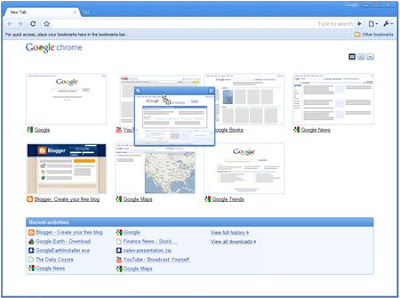
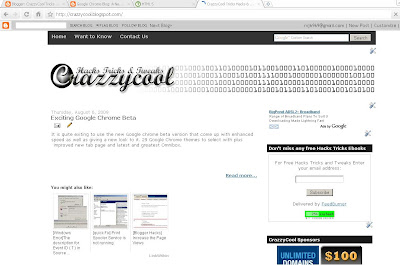
It is quite exiting to use the new Google chrome beta version that come up with enhanced speed as well as giving a new look to it. 29 Google Chrome themes to select with plus improved new tab page and latest and greatest Omnibox.
Normally new version try to improve the speed security and its features but always the changes done to the look and feel and interface is the one that bring the excitements.
Google chrome is speedy and simplest browser you can use around. Now you can add themes to it to make look funky or to match with your taste. Chrome is not a boring place any more.
Normally new version try to improve the speed security and its features but always the changes done to the look and feel and interface is the one that bring the excitements.
Google chrome is speedy and simplest browser you can use around. Now you can add themes to it to make look funky or to match with your taste. Chrome is not a boring place any more.
We have address small issue with the Chrome new tab page as it can snap up your working screen that you do not want someone to see. Now it is been improved that you can move around thumbnails and delete it straight away or hide it.
This is what Google has to say about speed and its HTML5 capabilities.
"Experience HTML5 capabilities
Google Chrome Blog: A New Beta: Why slow down when you can speed up?
We're always trying to further push the things you can do in the browser. For example, we've started building HTML5 capabilities into this beta release, including video tag functionality and web workers.
Speed, Speed, and more Speed
Beyond the improvements in JavaScript execution in this latest beta, there are a host of other improvements that should help Google Chrome make the most of your network connection. For example, when you open a new web page while other web pages are still loading, Google Chrome is now smarter about prioritizing the requests for the new page -- for instance, fetching text, images, and video for your new page -- ahead of the requests from the older pages. Loading pages on this beta release should also be faster than ever with DNS caching, more efficient DOM bindings, and using V8 for proxy auto-config."
This is a good start for the Google Chrome Operating System and I am sure it will pretty much look and function like Chrome Browser.
Labels:
Google,
Google Chrome
Wednesday, July 8, 2009
Introducing the Google Chrome OS
Google has officially announced the Google Chrome Operating System to be launched in mid 2010. Their main attempt is to re-think what operating systems should be as most of the OS available in market is designed in an era where there was no web.
Previously Microsoft had it competition with Google in Internet mainly search engine. But now it will be extend to operating system level where Microsoft is dominating at the movement. It will always be a challenge as we did not see major change in the concept of the operating systems we are using at the movement and first operating system. It will the time to re think for all the current OS to compete with new Google Chrome OS.
Speed, Simplicity and security are the key aspects of Google Chrome OS.
" Google Chrome OS will run on both x86 as well as ARM chips and we are working with multiple OEMs to bring a number of netbooks to market next year. The software architecture is simple — Google Chrome running within a new windowing system on top of a Linux kernel. For application developers, the web is the platform. All web-based applications will automatically work and new applications can be written using your favorite web technologies. And of course, these apps will run not only on Google Chrome OS, but on any standards-based browser on Windows, Mac and Linux thereby giving developers the largest user base of any platform "
What you think about Google Chrome OS? How it is going to be?
Labels:
Google,
Google Chrome
Saturday, June 13, 2009
What Google Chrome Thumbnails can tell about you
 If you are using Google Chrome this might be something you might have to think twice. This is something really simple but can be end up with serious results.
Google Chrome has this user friendly feature that will show the thumbnails of the mostly visited websites by you. It is quite similar to take a print screen. I have noticed that it keep on taking the password protected pages. For example I can see the view of my Gmail, Facebook accounts in the Chrome Thumbnails.
If you working on a shared computer environment this is something you must take into consideration as these thumbnails might gives out any secret information of you out. If it is a regular page that you visit and if it display some of your secrets or secret picture in a password protected page but Google chrome might show it out.
Always use the Remove Thumbnails link below to remove such thumbnails from Google chrome New Tab.
Labels:
Google,
Google Chrome,
Google Hack
Thursday, December 11, 2008
Google to take Chrome out of Beta!
Chrome
As of today, it is still in Beta but Google's vice president Marissa Mayer said Chrome will be out of Beta before the end of the year.
This will probably be one the fastest product developed by Google that will be taken out of Beta given Gmail is still officially in Beta for last 5yrs??
Google Chrome news was accidentally leaked on September 1, 2008 and it was officially launched on September 2, 2008
Surprisingly, Chrome is not yet available on Mac!
As of today, it is still in Beta but Google's vice president Marissa Mayer said Chrome will be out of Beta before the end of the year.
This will probably be one the fastest product developed by Google that will be taken out of Beta given Gmail is still officially in Beta for last 5yrs??
Google Chrome news was accidentally leaked on September 1, 2008 and it was officially launched on September 2, 2008
Surprisingly, Chrome is not yet available on Mac!
Labels:
Google,
Google Chrome,
Web Browser
Sunday, November 23, 2008
Rank and Comment Google Result
I have notice a cool feature with Google during this weekend. When I Google something for example 'CrazzyCool' using Google Chrome browser result allow me to rank the result I am getting plus adding public comments. Using the arrows next to the result you can move it up or down.
Still I am not sure impact onactual Google Page Ranking and this, but I am sure this is another beta testing Google is trying out with Google. You will not see this feature in FireFox or Internet Explorer.

Still I am not sure impact onactual Google Page Ranking and this, but I am sure this is another beta testing Google is trying out with Google. You will not see this feature in FireFox or Internet Explorer.


Labels:
Google Chrome
Subscribe to:
Posts (Atom)
