Showing posts with label iPad. Show all posts
Thursday, September 20, 2012
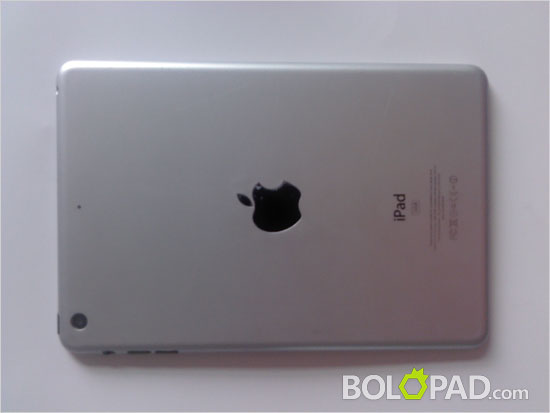
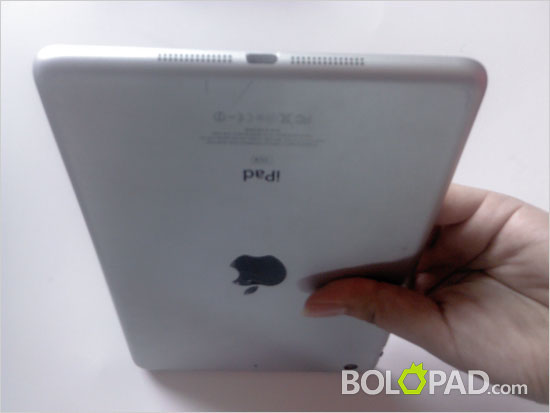
iPad Mini leaked images
Just after iPhone 5 release iPad mini rumors are started to come out. Here are some recently leaked iPad mini images.
Thursday, March 8, 2012
Apple iPad 2 Vs iPad 3 – What is really cool about new iPad
Apple chief executive Tim Cook gave the official announcement of the iPad 3 (new iPad). As usual there are so many questions to be answered.
Should I buy the new iPad?
Is new iPad is just there to make you buy iPad2?
What so new about iPad 3?
These are few such questions.Let’s have quick comparison of iPad 3 and iPad 2.
Just by looking at new iPad’s features it seems like it is almost same as previous iPad. New iPad is just a little bit bigger and heavier (51g). Display size, battery power and storage is same as before. Then what is so cool about new iPad?
It’s pretty much double the resolution. New iPad has the new Retina display with 2048x1536 resolutions. You will have a great experience watching videos and browse through images. The A5X chip with quad-core graphics drives four times the pixels of iPad 2. This is the key improvement in new iPad comparing to iPad 2.
Apple did not forget to add 5MP iSight camera. Previously it was equipped with 0.7MP camera. It allows you to shoot 5 MP still images and record HD video.
It supports the fastest mobile network, 4G LTE. It also works on GSM/UMTS worldwide network technologies including HSPA+ and DC-HSDPA — the fastest 3G networks out there.
You should not forget that new iPad also powered by lates iOS and iClouds and Dictation. That does not mean that you cannot use any of the other apps in Apple iStore.
Now the biggest question is what is should we call new iPad? Just new iPad, iPad 3 or something else?
Should I buy the new iPad?
Is new iPad is just there to make you buy iPad2?
What so new about iPad 3?
These are few such questions.Let’s have quick comparison of iPad 3 and iPad 2.
Just by looking at new iPad’s features it seems like it is almost same as previous iPad. New iPad is just a little bit bigger and heavier (51g). Display size, battery power and storage is same as before. Then what is so cool about new iPad?
It’s pretty much double the resolution. New iPad has the new Retina display with 2048x1536 resolutions. You will have a great experience watching videos and browse through images. The A5X chip with quad-core graphics drives four times the pixels of iPad 2. This is the key improvement in new iPad comparing to iPad 2.
Apple did not forget to add 5MP iSight camera. Previously it was equipped with 0.7MP camera. It allows you to shoot 5 MP still images and record HD video.
It supports the fastest mobile network, 4G LTE. It also works on GSM/UMTS worldwide network technologies including HSPA+ and DC-HSDPA — the fastest 3G networks out there.
You should not forget that new iPad also powered by lates iOS and iClouds and Dictation. That does not mean that you cannot use any of the other apps in Apple iStore.
Now the biggest question is what is should we call new iPad? Just new iPad, iPad 3 or something else?
Sunday, July 24, 2011
Save your day with Portable Wi-Fi Hotspot Application
Even though you might not notice, internet is a important factor for your business as well as for your day today life. You will only notice it when you had to spend a day or week without internet. Specially if you move your house or business you might have to live without internet for couple of days. If you have a smart phone, specially a Android base smart phone or iPhone 4 with 3G connection you will not have to suffer with out a internet connection.
Portable hotspot is a added feature of Android 2.2 and Apple introduce it in iPhone 4. As the name suggest you can transform your mobile in to a Wi-Fi hotspot and connect your laptops, ipads or tablet devices enjoy the internet. If you are traveling and cannot miss emails and surfing net this is going to be a cost effective way.
How you can save money
- You do not have to buy 3G plans for all the portable devices.
- You can select Wi-Fi only devices and save one time cost. For example you can go for iPad Wi-Fi which is cheaper comparing to iPad 3G.
Things to consider....
- Select a good 3G plan with higher download limit.
- Remember to take USB or normal mobile phone charger.
- Enable this to the device you always take with you specially if you have couple of phones.
- Make sure you disable the Wi-Fi Hotspot when you are not using it.
Drawbacks
- Portable Wi-Fi Hotspot is not supported by all the Android devices or iPhone 3G or 3GS
- iPhone 3G or 3GS needs to be jailbreak and install MyWi via Cydia.
- You may run out your mobile battery if you forget to take your charger. (Carrying a USB charger in your bag would be a good idea.)
How to Enable Pocket Wi-Fi in Android phone
- If your Android phone is supporting this feature and updated to Android 2.2 or later then you will have this option under All Apps.
- Simply go to Home Screen and Menu and All Apps and click on the Wi-Fi Hotspot
- Then you can specify a router name, Security Type and Password for the Wi-Fi Connection.
How to Enable Pocket Wi-Fi for Apple iPhone 4
- Under the Settings you will find a option Personal Hotspot and you can enable disable it and change the password.
If you are traveling a lot and use internet you can try the Smart phone pocket Wi-Fi Feature.
Thursday, July 21, 2011
How to solve the iPad Wifi Problems
Apple iPad 2 is having some issues connecting to certain Wifi connections and Apple forum was filled with complains and requesting help. Many claim that Wireless will be drooping N (802.11n) in 2.4 and 5 GHz bands specially if they do not use the mix mode. Apple has officially confirmed that there is a issue and suggested some solutions for that in Apple support.
iPad Wifi Issue Symptoms
* WiFi will only work for a short while, then completely stop.
* Dropping WiFi connection constantly.
* iPad2 shows good signal strength but nothing works via WiFi
* iPad is restarted or wakes from sleep state, it fails to join the known and remembered WiFi wireless network
Suggested Solutions
Fix your Router
* Update Wi-Fi router firmware - All most all the modern routers allows you to upgrade it's firmware. Simply check whether a update available for the router model and log in to your router from a web browser and
upgrade the Browser firmware.
* Use WPA or WPA2 wireless security instead of WEP. Again you should be able to change this setting by login to the router.
Changes for your iPad
* I am not sure how adjust screen brightness will effect the iPad WiFi connection but Apple suggest to switch off the auto brightness and increase the brightness. You can change the settings from Settings > Brightness & Wallpaper.
* Renew IP address of iPad.
Tap Settings > Wi-Fi > Select the Wi-Fi network you are currently using and tap Renew Lease
Apple will be fixing the iPad Wifi problem in the future software updates but until then you can try the above methods.
iPad Wifi Issue Symptoms
* WiFi will only work for a short while, then completely stop.
* Dropping WiFi connection constantly.
* iPad2 shows good signal strength but nothing works via WiFi
* iPad is restarted or wakes from sleep state, it fails to join the known and remembered WiFi wireless network
Suggested Solutions
Fix your Router
* Update Wi-Fi router firmware - All most all the modern routers allows you to upgrade it's firmware. Simply check whether a update available for the router model and log in to your router from a web browser and
upgrade the Browser firmware.
* Use WPA or WPA2 wireless security instead of WEP. Again you should be able to change this setting by login to the router.
Changes for your iPad
* I am not sure how adjust screen brightness will effect the iPad WiFi connection but Apple suggest to switch off the auto brightness and increase the brightness. You can change the settings from Settings > Brightness & Wallpaper.
* Renew IP address of iPad.
Tap Settings > Wi-Fi > Select the Wi-Fi network you are currently using and tap Renew Lease
Apple will be fixing the iPad Wifi problem in the future software updates but until then you can try the above methods.
Saturday, November 20, 2010
Top 5 iPad apps
iPad is one of the successful development products of Apple. iPad is one great platform for all the different kinds of entertainments like movies, games, music, videos, books and many more. It is really incredible to believe that a product weighing just 700 grams can become a platform for different multi tasking applications. Since the official announcements of iPad were in rumors, people in advance booked their iPad phones. iPad is one of the best running and selling instruments till date. Both businessmen and college students are in love with the various iPad applications.
Top 5 iPad applications:
1: Kindle
Before reading about the Kindle application for iPad, it is important to forget the rumors that say kindle as an iPad killer, etc. Actually kindle application for iPad has done a great entertainment for the kindle users who have recently purchased iPad with kindle app. With the help of visual page swipes in iPad, kindle application becomes a great reading experience. All bookworms should consider this application while buying a new iPad.
2: Wkipanion for iPad
Wkipanion is best for searching or referring any keyword or phrase. Downloading this application in your iPad helps you to refer any unknown key phrase within seconds. Also it helps to bookmark favorite entries for further reference or use.
3: Google Mob Application
Google is the best search engine on internet till date. There is no other application or search box that can help to perform your search referrals. Downloading Google mobile application helps to get familiar with any unknown site or keyword. The best thing about this application is its location search that helps you to find out all local hospitals, restaurants, hotels or landmarks around you.
4: Wordpress
Blogging has become one of the great things today and people really enjoy out their blogging activities using their iPad. IPad helps to download wordpress app for continuing their blogging from their iPad device. This application helps to post or edit any new or old blog from your iPad device using internet connection.
5: AOL messenger
The introduction of messenger is generally for keeping touch with your social friends. AOL’s instant messenger helps you to stay connection with your friends and relatives. In short, it gives you a continuation in your social life by being in touch with your fast friends. I guess this application can help you to save pennies that are usually spent on national and international text messages.
Thus, all these five applications are must for your iPad device. Some other great applications for your iPad are Evernote, Zinio Magazine, Asphalt, Twitterrific, Desktop connect, Fight control, etc.
Top 5 iPad applications:
1: Kindle
Before reading about the Kindle application for iPad, it is important to forget the rumors that say kindle as an iPad killer, etc. Actually kindle application for iPad has done a great entertainment for the kindle users who have recently purchased iPad with kindle app. With the help of visual page swipes in iPad, kindle application becomes a great reading experience. All bookworms should consider this application while buying a new iPad.
2: Wkipanion for iPad
Wkipanion is best for searching or referring any keyword or phrase. Downloading this application in your iPad helps you to refer any unknown key phrase within seconds. Also it helps to bookmark favorite entries for further reference or use.
3: Google Mob Application
Google is the best search engine on internet till date. There is no other application or search box that can help to perform your search referrals. Downloading Google mobile application helps to get familiar with any unknown site or keyword. The best thing about this application is its location search that helps you to find out all local hospitals, restaurants, hotels or landmarks around you.
4: Wordpress
Blogging has become one of the great things today and people really enjoy out their blogging activities using their iPad. IPad helps to download wordpress app for continuing their blogging from their iPad device. This application helps to post or edit any new or old blog from your iPad device using internet connection.
5: AOL messenger
The introduction of messenger is generally for keeping touch with your social friends. AOL’s instant messenger helps you to stay connection with your friends and relatives. In short, it gives you a continuation in your social life by being in touch with your fast friends. I guess this application can help you to save pennies that are usually spent on national and international text messages.
Thus, all these five applications are must for your iPad device. Some other great applications for your iPad are Evernote, Zinio Magazine, Asphalt, Twitterrific, Desktop connect, Fight control, etc.
Thursday, October 21, 2010
[ShareMe] 40 iPad Apps That Librarians Love
I know some of you love your iPad and if it is iProduct then we cannot forget it is great collection of applications. Thanks Carrie for sharing the 40 great iPad applications helpful for librarians.
Librarians wear many hats at one time. Besides managing their space, they also organize events, reach out to the community and enhance the feel of the library, making it a timeless treasure that is making a major comeback. Libraries now stock DVDs new and old, the latest bestsellers and magazine and newspapers that we can’t always find at our local stands.
iBooks This e-reader allows you to sample a page of many books before you decide to put in an order.
Kindle Like iBooks, this is an e-reader app that’s powered by Amazon. It’s different because it offers a far wider variety of books than iBooks.
Stanza This app is a standout because it works across the board with your iPhone or Touch, allowing you to catch up with your reading or selections no matter what toy you’re working with.
Howcast Learn how to do anything and everything from this clever video app that brings how-tos right to your screen.
Tweeterena 2 If you’re only tweeting on the iPad, this is one of the best apps since it’s scaled to fit the larger screen.
You can find the rest of 35 cool iPad application collection that librarians love at onlinecolleges.org.
Librarians wear many hats at one time. Besides managing their space, they also organize events, reach out to the community and enhance the feel of the library, making it a timeless treasure that is making a major comeback. Libraries now stock DVDs new and old, the latest bestsellers and magazine and newspapers that we can’t always find at our local stands.
iBooks This e-reader allows you to sample a page of many books before you decide to put in an order.
Kindle Like iBooks, this is an e-reader app that’s powered by Amazon. It’s different because it offers a far wider variety of books than iBooks.
Stanza This app is a standout because it works across the board with your iPhone or Touch, allowing you to catch up with your reading or selections no matter what toy you’re working with.
Howcast Learn how to do anything and everything from this clever video app that brings how-tos right to your screen.
Tweeterena 2 If you’re only tweeting on the iPad, this is one of the best apps since it’s scaled to fit the larger screen.
You can find the rest of 35 cool iPad application collection that librarians love at onlinecolleges.org.
Friday, October 8, 2010
Cannot Attach a file to an email in iPad
This is another small but stupid limitations in iPad. This is the Apple way and it is really working for Apple and nobody really worry about it or complain about it. If someone complain about it they he/she is a wired person. Anyways lets see the quick solutions to email attachment problem in iPad until Apple provide a upgrade.
If you receive a email with an attachment then you can forward the message with or without the Attachment. So you can attach a file and send a email from your MAC Computer or even Windows computer to iPad and then you will be able to add and send the email attachment from your iPad. This is a bit funny solution just like one we provided for the iPhone SMS forwarding problem we had initially.
Apple has a strong App Community, which can provide any kind of solution for the Apple limitations. GoodReader is a better solutions for email attachment problem as well as viewing Windows files and any large PDFs without any problem.
If you receive a email with an attachment then you can forward the message with or without the Attachment. So you can attach a file and send a email from your MAC Computer or even Windows computer to iPad and then you will be able to add and send the email attachment from your iPad. This is a bit funny solution just like one we provided for the iPhone SMS forwarding problem we had initially.
Apple has a strong App Community, which can provide any kind of solution for the Apple limitations. GoodReader is a better solutions for email attachment problem as well as viewing Windows files and any large PDFs without any problem.
Thursday, January 28, 2010
is iPad just another cute device
Steve Jobs (Apple CEO) announced the long waited Apple tablet during the Apple Press Conference on January 27, 2010. It is called iPad and looks like a large iPod touch.
iPad features and hardware configuration.
• Display 9.7 – inch IPS
• Thin 12.7mm
• Weight 0.68Kg
• Processor 1GHz custom Apple chip (A4)
• Include a Keyboard functions as a dock.
What are the options you have?
You can have 16GB – US$499, $32GB - $599 and 64GB – US$699. For additional US$130 you can have the 3G model.
At a glance, you cannot see any excitement in iPad. It is a very new gadget to the tech world. Tablet PCs been around the world for some times but this is the first time Apple introducing such a device. As Steve Jobs precented, it sits between the iPod and MacBook.
iPod replaced the walkmans. iPhone replaced the normal phones. People argue that iPad is not trying to replace any of the existing devices we use today. For me iPad is more like device that Apple uses to experiment the market for a future killing product.It is more like a iPod touch which is in between the iPhone and iPod. What can we expect next?
Apple announces iPad
iPad features and hardware configuration.
• Display 9.7 – inch IPS
• Weight 0.68Kg
• Processor 1GHz custom Apple chip (A4)
• Include a Keyboard functions as a dock.
What are the options you have?
You can have 16GB – US$499, $32GB - $599 and 64GB – US$699. For additional US$130 you can have the 3G model.
At a glance, you cannot see any excitement in iPad. It is a very new gadget to the tech world. Tablet PCs been around the world for some times but this is the first time Apple introducing such a device. As Steve Jobs precented, it sits between the iPod and MacBook.
iPod replaced the walkmans. iPhone replaced the normal phones. People argue that iPad is not trying to replace any of the existing devices we use today. For me iPad is more like device that Apple uses to experiment the market for a future killing product.It is more like a iPod touch which is in between the iPhone and iPod. What can we expect next?
Subscribe to:
Posts (Atom)