This is bit of funny but it happened for one of my friend. He had to forward a SMS which is already in is message bank. It was a name of a Book he needed to forward so he needs the exact name and author.
How to forward the SMS?
1. Open the SMS
2. Write it down on a paper
3. Start a new SMS and select the mobile number that you needed to forward.
4. Type the exact message you wrote on the paper.
5. Double check for typos.
6. Send the message.
I think iPhone need to fix this. It is something really missing in iPhone. It has really good features but missing some really needed features.

Wednesday, October 29, 2008
Tuesday, October 28, 2008
Google Calendar & Google Docs in Gmail
This is something I thought Gmail was missing for sometimes. Now they have give you option to add Google Calender and Google Docs to left-nav next to Chat and Labels.
I think idea behind the Labs is to make developers and users think open and give every CrazzyCool idea a chance to shine. Users will decide whether it is good or bad.
Official Gmail Blog: New in Labs: Calendar and Docs gadgets
I think idea behind the Labs is to make developers and users think open and give every CrazzyCool idea a chance to shine. Users will decide whether it is good or bad.
Official Gmail Blog: New in Labs: Calendar and Docs gadgets

Download CrossOver Mac, Gmaes Mac, Linux and Games Linux for free
Get the following softwares for free. Basically their main website is down. I guess it is due to the high traffic. So they have extended the offere to additional 48 hours
Click Here to get your serial number for CrossOver.
And then download the trial version and after the main website is back online you will be able to register them as full versions for free.
Click Here to get your serial number for CrossOver.
And then download the trial version and after the main website is back online you will be able to register them as full versions for free.
Download CrossOver Mac Pro Trial
Download CrossOver Games Mac Trial
From codeweavers.com. Register now!!
Labels:
Crossover,
Free Download
Monday, October 27, 2008
XML Parsing Error: error in processing external entity reference Location
When you start FireFox sometimes you get this erorr. I am not sure what course this error.
XML Parsing Error: error in processing external entity reference
Location: chrome://browser/content/browser.xul
Line Number 18, Column 1:
%browserDTD;
You can simply fix this error by runing the FireFox setup again on top of current installation. You do not need to uninstall your current FireFox.
If you have important bookmarks better to take backup of your profile by coying the folder
(In Vista : App Data > Roaming > Mozilla > FireFox > Profile ) to Desktop or some other secure location.
Labels:
FireFox
Sunday, October 26, 2008
Quote From Weekend Reading
I just read through the first chapters of the book "Creativity in Business" by Carol kinsey thought of sharing some of the coolest thing I found over there.
" Years ago in a newspaper column of Ripley's "Believe It or Not" the following item appeared: A plain iron bar is worth $5.00. If you take that iron bar and forge horseshoes from it , the value increase to $10.50. If it is made into needles the value rise to $3,285.00. And if you make watch springs from it, it then is worth $250,000.00. Ergo the difference between $5.00 and $250,000.00 is creativity"
I am sure the now the values are changed but it is pretty good example for creativity.
" Years ago in a newspaper column of Ripley's "Believe It or Not" the following item appeared: A plain iron bar is worth $5.00. If you take that iron bar and forge horseshoes from it , the value increase to $10.50. If it is made into needles the value rise to $3,285.00. And if you make watch springs from it, it then is worth $250,000.00. Ergo the difference between $5.00 and $250,000.00 is creativity"
I am sure the now the values are changed but it is pretty good example for creativity.
Labels:
Creativity
Saturday, October 25, 2008
Google Broken Link

I just found this broken link in the Google home page. Adsense link take me to a broken link page. Hope they will fix it soon

Update: Ok it is nothing to do with Google. I get this page does not found only in IE8 (beta). It is another IE8 bug it seems. It is pretty strange that Google will leave a broken link in their home page for more than 24 hours. Link works 100% in FireFox. IE8 team should fix this before taking the Beta tag off.
GMail With Smilies :) :) :)
It is true that Gmail has many interesting features (Gmail Chat, Labs) that other email services does not provide. But you could not send smilies with your email via Gmail. This was something missing in GMail for quite a long time. Dark days are over. Now you can send Email full of Smilies. Yes quite a lot of smilies. Pictures worth thousand words. So here is the full list of smilies.
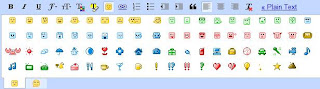
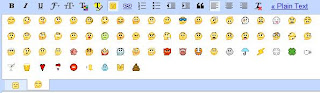
Official Gmail Blog: A picture is worth a thousand words


Official Gmail Blog: A picture is worth a thousand words
Labels:
Gmail
Thursday, October 23, 2008
PDF to Word Conversion
This is interesting. Most of the time I am stuck when it comes to edit PDFs. This will be a handy tool that you can convert PDFs to Word. You can do the changes and then you can convert back to PDF.
You can either download it for free or you can conver pdf to word online. How cool is that.
Convert Word or any other format to PDF you can use CIB PDF brewer which is another free PDF convertor.
Read more...
Download Latest e-books for free (it is leagal)
You can either download it for free or you can conver pdf to word online. How cool is that.
Convert Word or any other format to PDF you can use CIB PDF brewer which is another free PDF convertor.
Read more...
Download Latest e-books for free (it is leagal)
Labels:
PDF to Word
Wednesday, October 22, 2008
Intelligent Auto Reply
Do you want to set up a different reply to different people. Yes now you can do it with new member in Gmail Lab. This crazzycool feature allows you to select different reply messages base on the key words. Automatically it will send the reply to the sender. How cool is that. It is quite intelligent. GMail call it Canned Responses.
How to use it?

Enable this crazzycool feature in by going to Settings > Labs and you can enjoy it.
Official Gmail Blog: New in Labs: Canned Responses
Official Gmail Blog: New in Labs: Canned Responses
Labels:
Gmail
Google Hacks Directory - Simplified
Google hacks is quite famous. It is quite simplest method to find hidden information in cyber space. Google Web cam hack, find mp3, e books, vedios, Torrents, Proxy are few of the common hacks. However, to do this you just have to provide Google bit complicated search string. For example normally you search for "Britney Spears mp3". It will give you many sites with information and places to buy Britney Spears mp3. With a small hack you can find all the Britney Spears mp3 indexes.
That search string is
-inurl:(htmhtmlphp) intitle:"index of" +"last modified" +"parent directory" +description +size +(.mp3.wma.ogg) "Britney Spears mp3"
I know that is bit too long to remeber and bit complicated too. One way is to seach Google to find Google hacks and copy this code in a file and next time when you want to search for Akon mp3 change where it says "Britney Spears mp3" to "Akon mp3". Quite simple but it is not simpl enough.
-inurl:(htmhtmlphp) intitle:"index of" +"last modified" +"parent directory" +description +size +(.mp3.wma.ogg) "Akon mp3"
Google hacks is small program that will generate the complicates search string for you. It is so simple and small file to be downloaded. Remeber one thing always download it from the original place. You can find this cool application from Google code.
This is what Jason Stallings who create this application tell us about Google hacks.
"Google Hacks is a compilation of carefully crafted Google searches that expose novel functionality from Google's search and map services. For example, you can use it to view a timeline of your search results, view a map, search for music, search for books, and perform many other specific kinds of searches. You can also use this program to use google as a proxy. "
I like the portable version which is less that 2MB and it is cool. Do you like it?
That search string is
-inurl:(htmhtmlphp) intitle:"index of" +"last modified" +"parent directory" +description +size +(.mp3.wma.ogg) "Britney Spears mp3"
I know that is bit too long to remeber and bit complicated too. One way is to seach Google to find Google hacks and copy this code in a file and next time when you want to search for Akon mp3 change where it says "Britney Spears mp3" to "Akon mp3". Quite simple but it is not simpl enough.
-inurl:(htmhtmlphp) intitle:"index of" +"last modified" +"parent directory" +description +size +(.mp3.wma.ogg) "Akon mp3"
Google hacks is small program that will generate the complicates search string for you. It is so simple and small file to be downloaded. Remeber one thing always download it from the original place. You can find this cool application from Google code.
This is what Jason Stallings who create this application tell us about Google hacks.
"Google Hacks is a compilation of carefully crafted Google searches that expose novel functionality from Google's search and map services. For example, you can use it to view a timeline of your search results, view a map, search for music, search for books, and perform many other specific kinds of searches. You can also use this program to use google as a proxy. "
I like the portable version which is less that 2MB and it is cool. Do you like it?
Labels:
CrazzyCool,
Google Hack
Thursday, October 16, 2008
FREE Demonoid Invitation Code Giveaway! --- IT's Back
After the popular first round of Demonoid giveaway couple of months (In August) .... we are back!!!
The rules are simple as before..
Here's all you need to do..
Leave a comment with your Name, email address, Location and What you want to use DEMONOID for.
Wait till the next 24hrs after posting the comment and keep checking this blog.
If no one else has posted a comment after your comment in the following 24hrs, you will be chosen as the winner and will receive the invitation code in your emailbox within 1 day.
Sounds fair? So lets get started..
The rules are simple as before..
Here's all you need to do..
Leave a comment with your Name, email address, Location and What you want to use DEMONOID for.
Wait till the next 24hrs after posting the comment and keep checking this blog.
If no one else has posted a comment after your comment in the following 24hrs, you will be chosen as the winner and will receive the invitation code in your emailbox within 1 day.
Sounds fair? So lets get started..
Labels:
CrazzyCool,
demonoid,
Free,
invitation,
torrent
Wednesday, October 8, 2008
Windows Group Policy – Hacks and Tricks (Part 3)
I have been explaining about windows group policy settings that are quite useful. However that was just basic and did not explain much hacks or tricks.
In Windows XP operating system if you change any Windows group policy setting it just apply it to Administrator account as well. Especially if you restrict some access to hard drive partition or Run Command it restrict for Administrator as well. That depends on the setting you apply is a user account policy or machine policy. Normally Machine policy will apply to all the users. You can control user account policies base on users. However, Windows XP dose not support domain users like Windows server versions so even user account policies will apply to all the users.
I am using a simple trick to solve this issue. Not 100% but it makes life easier. In the beginning I just mention to copy a shortcut of gpedit.msc to the desktop. Reason behind that is when you play with Windows group Policies it is very easy to hide or prevent access to your hard drives. You will notice it after you restart your machine. Now you do not have access to gpedi.msc. You might have prevent access to “Run” as well.
Trick 1: If you done something like above situation you can simply solve it by creating a shortcut manually.
Right click on the desktop and go to “new” and select “shortcut”. It will ask you to give a path. If you have prevent access to your hard drive then you will not able to select the path so just select some other target like Desktop and click “Finish”.
Right click on the shortcut that you created and select properties and fill the details for gpedit.msc
Default Values
Target: C:\WINDOWS\system32\gpedit.msc
Start in: C:\WINDOWS\system32\
Click “Apply” and it will create a shortcut for gpedit.msc and now you will able to access gpedit.msc and change Group Policy
Trick 2: Use Trick 1 and before you disable any Program or Hard Drive you can create a short cut in Desktop. It will allow you to access these programs while other uses do not have any access.
Example: Prevent Access to Computer Hard Drives
First create a short cut to the Drives you going to hide or prevent access.
Then open the gpedit.msc [Start > Run > (type) gpedit.msc > Enter]
In Group Policy > User Configuration > Administrative Template > Desktop > Enable the “Remove My Computer icon on the Desktop”
If you need specific driver to be hidden you can go to In Group Policy > User Configuration > Administrative Template > Windows Component > Windows Explorer > and select the specific drivers from “hide these specific drivers from My Computer”
If you prevent access for My Computer, shortcuts will not be working.
Previous Posts
Windows Group Policy (gpedit.msc) explained (Part 2)
Windows Group Policy (gpedit.msc) explained
Take a break
Who is the sexiest?
In Windows XP operating system if you change any Windows group policy setting it just apply it to Administrator account as well. Especially if you restrict some access to hard drive partition or Run Command it restrict for Administrator as well. That depends on the setting you apply is a user account policy or machine policy. Normally Machine policy will apply to all the users. You can control user account policies base on users. However, Windows XP dose not support domain users like Windows server versions so even user account policies will apply to all the users.
I am using a simple trick to solve this issue. Not 100% but it makes life easier. In the beginning I just mention to copy a shortcut of gpedit.msc to the desktop. Reason behind that is when you play with Windows group Policies it is very easy to hide or prevent access to your hard drives. You will notice it after you restart your machine. Now you do not have access to gpedi.msc. You might have prevent access to “Run” as well.
Trick 1: If you done something like above situation you can simply solve it by creating a shortcut manually.
Right click on the desktop and go to “new” and select “shortcut”. It will ask you to give a path. If you have prevent access to your hard drive then you will not able to select the path so just select some other target like Desktop and click “Finish”.
Right click on the shortcut that you created and select properties and fill the details for gpedit.msc
Default Values
Target: C:\WINDOWS\system32\gpedit.msc
Start in: C:\WINDOWS\system32\
Click “Apply” and it will create a shortcut for gpedit.msc and now you will able to access gpedit.msc and change Group Policy
Trick 2: Use Trick 1 and before you disable any Program or Hard Drive you can create a short cut in Desktop. It will allow you to access these programs while other uses do not have any access.
Example: Prevent Access to Computer Hard Drives
First create a short cut to the Drives you going to hide or prevent access.
Then open the gpedit.msc [Start > Run > (type) gpedit.msc > Enter]
In Group Policy > User Configuration > Administrative Template > Desktop > Enable the “Remove My Computer icon on the Desktop”
If you need specific driver to be hidden you can go to In Group Policy > User Configuration > Administrative Template > Windows Component > Windows Explorer > and select the specific drivers from “hide these specific drivers from My Computer”
If you prevent access for My Computer, shortcuts will not be working.
Previous Posts
Windows Group Policy (gpedit.msc) explained (Part 2)
Windows Group Policy (gpedit.msc) explained
Take a break
Who is the sexiest?
Labels:
Windows Group Policy,
Windows XP
Wednesday, October 1, 2008
Windows Group Policy (gpedit.msc) explained (Part 2)
These gpedit tricks will come handy if you want to control IE settings.
You can find the gpedit setting in the following location
Administrative Templates
>Windows Component
>>Internet Explorer
Some Interesting Settings
Enable Disable changing home page settings will disable uses changing the home page. First change the Internet Explorer Home page to what you want and enable this.
Enable Disable changing of Auto-Proxy scripts
Enable Disable changing Advanced Page Settings will add more security
Enable Disable changing proxy settings will stop users changing the proxy Settings from IE.
Administrative Templates
>Windows Component
>>Internet Explorer
>>> Toolbars
Disable customizing browser toolbar buttons & Disable customizing browser toolbar will stop users adding or deleting any toolbar buttons or doing any changes to the toolbar.
Administrative Templates
>Windows Component
>>Internet Explorer
>>> Internet Control Panel
Disable the Security page
Disable the Content page
Disable the Connection page
Disable the Programs page
Disable the Privacy page
Disable the Advanced page
These setting will come handy if you want to block someone being changing the Security setting, Privacy Setting and Advance settings for Internet Explorere.
Windows Group Policy (gpedit.msc) explained (Part 1)
You can find the gpedit setting in the following location
Administrative Templates
>Windows Component
>>Internet Explorer
Some Interesting Settings
Enable Disable changing home page settings will disable uses changing the home page. First change the Internet Explorer Home page to what you want and enable this.
Enable Disable changing of Auto-Proxy scripts
Enable Disable changing Advanced Page Settings will add more security
Enable Disable changing proxy settings will stop users changing the proxy Settings from IE.
Administrative Templates
>Windows Component
>>Internet Explorer
>>> Toolbars
Disable customizing browser toolbar buttons & Disable customizing browser toolbar will stop users adding or deleting any toolbar buttons or doing any changes to the toolbar.
Administrative Templates
>Windows Component
>>Internet Explorer
>>> Internet Control Panel
Disable the Security page
Disable the Content page
Disable the Connection page
Disable the Programs page
Disable the Privacy page
Disable the Advanced page
These setting will come handy if you want to block someone being changing the Security setting, Privacy Setting and Advance settings for Internet Explorere.
Windows Group Policy (gpedit.msc) explained (Part 1)
Subscribe to:
Posts (Atom)
