Showing posts with label USB. Show all posts

Wednesday, October 13, 2010

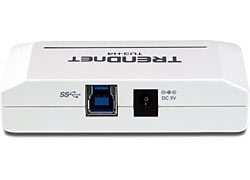
TrendNet 4-Port USB 3.0 Hub is out

TRENDnet’s 4-Port USB 3.0 Hub provides four super speed USB 3.0 ports to connect flash drives, storage enclosures, cameras, and other USB 3.0 devices to your computer.
You don't require to download any drivers and you can plug into any USB3.0 port on your PC or MAC.

Simply connect to an available USB port on your computer with the included USB 3.0 cable (backward compatible with USB 2.0). Upgrade to super speed USB 3.0 with TRENDnet’s TU3-H2EC or TU3-H2PIE. An included power adapter ensures proper operability of power hungry bus-powered connected devices.

Order your 4-Port USB 3.0 Hub  only for $69.99.
(No Affiliate Links)

Wednesday, July 21, 2010

SanDisk SDCZ40-064G-A11 64GB Ultra Backup USB 2.0

Backup your important pictures, documents is a must. How many times I have lost my files just because I was too lazy to do a backup. Backing up files will take time and lots of steps to follow. So, most of us do not bother getting any backups done. 64GB Ultra Backup is a good solution.

Product Specification


SanDisk Ultra Backup USB Flash Drive is the first USB flash drive with a backup button. No wires. No fuss. Just an easier way to protect your favorite photos, videos, songs and more - so you'll always have them with you.

Features

Simple - Back up at the touch of a button - no cables or software installation needed
Portable - Just put it in your pocket and protect your files wherever you are
Secure - Protect your data with password protection and AES hardware encryption
Backed by the minds behind flash memory - with our patent pending backup technology and a five-year limited* warranty


System Requirements

Intel Pentium PC or Macintosh computer with USB support
Windows 7, Windows XP, Windows Vista (Backup and Storage)
Windows 2000, Mac OS X v10.1.2+ and Linux(Storage only)
USB 2.0 port required for high-speed transfer
Requires high-power USB hub port

Monday, December 8, 2008

Installing an Operating System on Your USB

In my previous posts I have pointed out that it is really important to have Operating system in a CD (Live CD). USB is much easier than the CD. Sriram Sridharan posted step by step guide in his blog sriraminhell to install Linux version in to your USB flash drive.

Why it is important to have a OS installed in USB?

1. Portability - Not like a CD USB a flash drive is really small and you have high capacity so you will be able to have your files as well. Also, it is more reliable.

2. In a situation where your current OS is crashed you can retrieve the important files to your USB or another external hard drive.

3. Of course your can access any computer without cracking usernames or passwords. But do not do that as it is not ethical. Other hand it is impossible to stop your data been exposed or destroyed if you give access to hardware.

4. Recover Lost or fogotten passwords for your current OS.

This is a quite interesting post and can do many experiments base on it.


Blog Widget by LinkWithin