
Lets discuss some basic Windows7 tweaks. Changing Documents path. That's quite useful if you have two or more partitions you can move all user files to one partition and keep the Windows partition free of user files. Also it will be a good way to protect your files in any case something happened to windows7 as well as easy to take backups.
Changing Documents path is quite simple but bit different from Windows XP or Windows Vista.
1. Right Click on Documents folder. You can right click on Documents folder in start menu.
2. It is bit different to other Windows versions.
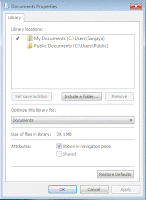
3. Click on the Include a folder and select the new path. This is something new in Windows7. You can select more than one folder for Documents folder. In Windows7 Documents folder acts as a virtual folder.
4. You can delete the default folders by right click on the folder and select remove.
5. Then right click on the main folder and select set as default location to save.
It is simple and but bit more advanced than Windows XP or Windows Vista.
It is simple and but bit more advanced than Windows XP or Windows Vista.

 Left Hand Side - Start Button and the Quick Launch button and open windows.
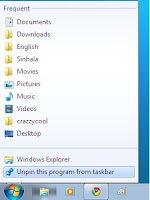 To delete these buttons from right click on the task bar button you want to remove and click Unpin this Program from taskbar.Also you can see the recently/frequently opened files by right click on the task bar button. Or by holding the mouse on the button and move the cursor upwards.All the open programs will go under each bottom and moving the mouse over each button will show the open windows. You can switch between the the windows or close them.
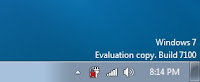 Task bar properties can be accessed by right click on the task bar and click on the properties. It give the options to


