Showing posts with label Cool. Show all posts

Monday, April 26, 2010

The easiest way to rebuild your PC!

Have you recently bought a PC or a laptop and wished you had all your favorite softwares installed in one hit so you do not have to find the latest installer version, remember most popular softwares that you have using, download the installation, install the software etc.. etc..

I have found a great software that does all this in one simple click. As described by the software vendor - you can rebuild your PC in three easy steps

1. Pick your favorite software (s) from their website http://ninite.com/
2. Click "Get Installer" and run it
3. You're done!

The software is free to use and there is a pro version for advance features such as offline mode.

Leave comments below if you have tried it or any other similar softwares.

Thursday, October 8, 2009

What is 44tips?

Are you lost in the cyber space? Do you remember all the forums, social networks, blogs and all sort of web sites you have joined? How many interesting sites you might have forgotten over the time? To be honest I have no clue. 44tips came up with a simple but cool idea to solve this problem.

What is 44tips?
44tips helps you Create a start page with everything you love!

Import your photos, videos, music, bookmarks and more
Bring all your online accounts together in one place: simple and organized!


View your favorite websites in one place
Read, view, listen and play! Easy access to all your favorite sources, like YouTube, Flickr, LastFM and Delicious.

Discover similar content
Find new content everyday with our suggestions of sites, videos, music and photos similar to what you already love: convenient and surprising.

Collect everything you like
Save the content you find and build collections of your favorite videos, music, photos and bookmarks. Or create your own multimedial presentation!

Share your 44tips with your friends
Send your favorite content to your friends. Give them tips about new music or videos and show them what makes you tick!

Keep up with your social networks
If you are using many different social networks, such as Twitter, Facebook, LinkedIn and Hyves, it’s easy to get lost. How to keep up with all those networks? How much time does it cost you to check for messages and updates?

Why don't you give 44tips a try and see how you can organize your favorite sites.

Friday, September 18, 2009

Quickly find out when Windows was last shutdown/rebooted

Every wondered to find out when your desktop was shutdown or rebooted by your mischievous sibling?

Here's a quick way

To find out last reboot
1) Open command prompt and type in

net statistics workstation | more

The second line will say


Statistics since ....

You can find out since when the machine is up

To Find out last shutdown

The easiest way to determine the last shutdown date/time is to check the event logs. When you shutdown a computer Event ID 6006 is written to the Event log which denotes a clean shutdown.

Thursday, June 25, 2009

Cheap but Reliable Webhosting

Disclosure: We are a professional review site that receives compensation from the companies whose products we review. We test each product thoroughly and give high marks to only the very best. We are independently owned and the opinions expressed here are our own.


If you are looking for a new web hosting plan or planning to move to a new web hosting plan this would be a great deal. If you are not may be it is not a good idea to waste time reading further.

Cost is only $6.95 per month. That is crazzy.

Unlimited hosting space - You do not have to worry about upgrading or moving to another plan when your site grow. Ideal for websites that host multimedia files or files servers.

Unlimited file transfer - You do not have to worry about the bandwidth. You site wont stop working just because you exceed the bandwidth limit.

Host Unlimited Domains - may be you can help your friend host his domain as well.

If you really find this interesting check it out at bluehost.com. Try out demo cPanel control which you will have to work with for rest of your life may be.

Free Domain included with the package. It is so simple as there are no different plans to select with.

These are my favorite: MySQL Databases, PostgreSQL Databases, CGI-BIN, Frontpage 2000/2002 Extensions, Shell Access (SSH), PHP 5, Perl 5, Python and many more ....

If you do not want to spend time and money developing you will find these website plug-in scripts really usfull. Web Blogs / Wordpress / b2evolution Mailing Lists Image Galleries / Coppermine (More!) Poll and Survey Software Moodle Tikiwiki Mambo and Joomla phpForm Generator Help Center/Support Ticket
If you are looking for web hosting plan this would be a great deal I guess. Why do not you have a look at bluehost.com

Thursday, June 4, 2009

Square your search results with Google Squared

Google always gives you a better search result and they are always work around to make it better. This is another dimension that you can think of giving out search result. Square your search result basically will try to identify the possible categories base on your search term and display most common factors of those categories. They the simple example for the search tern car in Google and then in Google square and see the difference. 

In Google it will provide you all the best links that Google can find in its index to you. But in Google Square it is display base on brands. Quite useful when you do quick research. You can always add more columns as you required.
Google is not the first search engine to come up with this sort of research friendly search result but always Google had followed the simple and efficiant way.

What do you think of Google square?

Official Google Blog: Square your search results with Google Squared

Friday, May 29, 2009

5 Useful Outlook settings

Outlook is one of the commonly use email client programs. Lets look at couple of useful setting or configurations in Outlook 2003 that will help you to manage your emails after you have successfully set up an email account with Outlook 2003. 

1# Automatic Send/Receive
By default after setting up your email account you need to click send/receive button each time to download new emails from server. You can simple automate it. 

Click on Tools > click on Options > go to Mail Setup tab > Shedule an automatic Send/Receive every 5 minutes. 

You can always change the interval but make sure not to give one minute. Always its better to have 3 minutes to 5 minute interval.

If you have multiple email accounts and if you would like to have different intervals for other accounts you can always define new groups by click in on the New button next to Group Name.


2# Manage Read Emails - Customize option for the reading pane

By default in Outlook 2003 new email will be marked as read when you change the selection. If you would like to change it and you would like to mark it as read only when you open the message in read pane for some times you can always change it.

Click on Tools > click on Options > go to Other tab > click Reading Pane
You will get couple of options 
          a. Mark Item as read when viewed in the reading pane for where you can tell number of seconds you would like to stay on the message before it marks as read.
          b. Mark Item as read when selection change (default)

3#  Why You should Auto Archive

With Outlook 2003 or any other outlook versions it is always been a good practice to archive your emails. There is a limitation in Outlook pst file (where emails are saved) . If you have reached the limit (1.8 -1.9 GB)  it will not let you download, delete or move any emails. You can create a new pst file and make it default so new emails will download.

Click on Tools > click on Options > go to Other tab > click Auto Archive


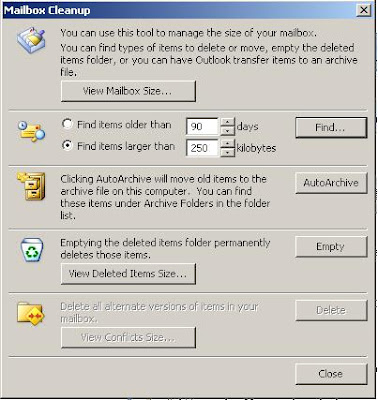
4# Mail Box Clean Up
Mailbox clean up can be used to detect the size of the current inbox and remove the emails that you do not use. 

you can check the sizes of each email folder - you know which folder is needed to be treated.
Find the emails by size. 
Empty the Deleted Item folder. 

Go to Tools > Click on Mailbox Cleanup

5# Ways to Organize Inbox

There are three ways you can organise your inbox. 
                     a. Using Folders
                     b. Using Colours
                     c. Using Views
These are quite helpful to organise your emails base on the importance of the email, sender or the situation.

go to Tools > click on Organize

We would like to see what other options you use to organise your Outlook inbox in comments.

Monday, April 13, 2009

Blogger Template Hacks - Change the colours and fonts easily

As I mentioned in the previous post I was going through the blogger blog templates to do some changes. This is something I have notice in the templates.

This hack will be useful to people who create Blogger templates. This will provide people who use your blog template user friendly way to change font, font colours and background colours as they want without accessing the HTML code.

After log in to Blogger account, under the Layout tab Font and Colours will provide you a easy interface to change font, font colour and background colour. When you create a template you can provide as many areas as you want.


How to add new property to the list.

This is a quite simple process and you just need to change CSS and add a new variable to the template as you required.

For example I am going to add background colour variable to column-wrapper(Side bar). Next time I will be able to select a different colour to my side bar without going to Edit HTML or figuring out the hex decimal code for the colour.

1. Go to Layout and then go to Edit Html.
2. Find the CSS for the column-wrapper.
3. Add the following line inside the column-wrapper.
background-color:$coloumnwrapperbgcolour;


background-color: is the CSS property for background.
$coloumnwrapperbgcolour; is the variable we will going to define next.

4. Scroll up until you find the place it defined the variables. Normally you can find it top of the page. Add the following line

<Variable name="coloumnwrapperbgcolour" description="Column Rapper Bg Colour"
type="color" default="#fff" value="#35556a">

Variable name should be same as the variable used in step 3
description you need provide a unique description to each variable you define. It need to be something you would understand later as this is going to be display in the list.
type in this case type will be color. If the variable is about font type would be font.

5. Click Save template. After it successfully updated go to Fonts and Colours.
Now you can easily update the Custom Blogger Bg Colour by just couple of clicks. You can apply it to other CSS properties you would think will be help.

Monday, February 2, 2009

Cash4Gold - super cool Superbowl Ad - Watch it here

Ed McMahon trades in his gold hip for cash and MC Hammer his gold records and pants! Check it out!

Watch more Dailymotion videos on AOL Video

Sunday, December 7, 2008

Free Ways to Help

Visit the Hunger Site

At The Hunger Site, there are many free ways you can fight hunger and food insecurity.

Click every day.

Did you know you can click once a day, every day at The Hunger Site? That's 365 chances each year to help feed the hungry.

Send a free e-card.

Use our free e-cards to tell everyone you know — friends, family, colleagues — about The Hunger Site. The more people who click every day, the more we can help feed those in need.

Tell friends, family and colleagues about The Hunger Site.

By spreading the word, you'll help increase the number of visitors to The Hunger Site and the amount of funding generated for food. Word of mouth — telling 5 friends who tell 5 friends — is a powerful way to fight hunger.

Make The Hunger Site your home page and visit daily.

Another easy way to remember to click every day is to make The Hunger Site your home page.


Below is the table of results produced so far. Support the good cause.

DateClicksCups of FoodKilogramsMetric TonsPounds
200743,857,42849,612,6162,813,3042,813.36,201,577
200642,344,55147,849,1612,713,3072,713.35,981,145
200542,493,35248,017,4862,722,8512,722.96,002,186
200439,809,11445,278,3732,567,5292,567.55,659,797
200338,785,49043,827,6022,485,2622,485.35,478,450
200240,798,84446,102,6942,614,2722,614.35,762,837

Wednesday, November 26, 2008

Ronnie Coleman Vs Arnold Schwarzenegger


Who is the greatest Bodybuilder of all time?

Who is a better person?

Who has their body in better shape? Not just Bulky and Big but great cuts??

You Decide!

Ronnie Coleman: He won the Mr. Olympia contest from 1998 - 2005!!
He has the world record of 8 straight wins in Mr. Olympia
He has a degree in accounting
He was a police officer
He has not admitted yet of taking steroids or illegal drugs. Only the the legal ones! Hard to believe though

Arnold Schwarzenegger: He won the Mr. Olympia contest from 1970-1975 and then 1980. Seven times
He is 61yrs old in 2008 (born 1941)
He was a famous hollywood actor
He is the current Governor of California
He was a migratant to America from one of the poorest countries in Europe (Austria)
He admitted publicly that he has taken steroids for muscle maintenance

Wednesday, September 24, 2008

How to log into multiple Gmail accounts simultaneously with same browser

This post applies to crazzy cool Chrome Browser!

Follow the steps

Open Chrome
Login in to Gmail.com (you have your one account open)
Open New Cognito Window in Chrome ( Press Ctrl + Shift + N)
Login in to Gmail.com (you hvae your second account open)


MAGIC!

Saturday, May 24, 2008

Crazzy Web: Rave Generator

This is another simple but fun web site...it s not about hacking, programming or coding...it s all about having fun ...Try this... you can be a dj ...full credit goes to toffu for sending me this site
You can select given Drum beats, breaks, bass or lead and creat your version of music...it is cool


Wednesday, April 30, 2008

Cool Software - Auto Clicker

This is not a hacking software. But it is really usefull if you have to repeatedly do mouse clicks. I had a small challange to extract data from a application where I had to select each row by clicking.

Auto Clicker Premium V1.0.0.3 took half of my job. It will ask you how many clicks you want and the interval between the clicks so Only thing I had to do was to move the mouse where I need. Clicking is done by Auto clicker.

If you have such chalange you can download auto clicker and give it a try. It is simple No need to install. Just an exe file and it is FREE.

I found couple of similar free programs but I found this one is user friendly.

Update:
I felt too lazzy. I can't bother scrolling the mouse. It is too boring. I whent for another options.

I found Automouse v1.3 which allows you to record your mouse clicks and repeat it. Wow it is so cool. Is it?

It only allows me 10 steps to be repeated again and gain. If i want unlimited I need to buy the full vesion. I just had to work around bit until I figure out a way to simply my process to less the 10 Steps.

And then Record my mouse movement with Automouse and replay it. It didnt work as I expected. I record the steps I want again and again but it did not work well.

I can change or add steps manually. Cool why not change the mouse clicks the way I want it.
Yep it works fine...........It is crazzy. Auto Mouse doing the job for me while I am writing this post.

If your looking for that .Download it here.

Updated: 10/09/2008
File Auto Clicker Primum 1.0.0.3 Is infected with Autoit.ANT

Tuesday, April 29, 2008

One Button - Add this

This is really cool website if you have a blog or a website and if you want to add links to the following book mark or feed sites

You need to add only one button for all this sites ... how cool is that ...

So you better try it yourself and it is totally free but you have register to get the botton.

Click here to go to Addthis.com


These are the list of sites that addthis web site provides.

Favorites, Google Bookmarks, Delicious, Digg, MySpace, Facebook, Furl, Yahoo, MyWeb, StumbleUpon, Reddit, Newsvine, Live Technorati, Twitter, Yahoo Bookmarks, myAOL, Ask Fark, Slashdot, Propeller, (Netscape) Mixx Multiply, Simpy Blogmarks, Diigo, Faves (Bluedot), Spurl, Link-a-Gogo, Mister, Wong, Feed,MeLinks, Backflip, Magnolia, Seganlo, Netvouz, Tailrank, Blinklist,

Thursday, April 17, 2008

How Slax can save your day?

How many times you lost your valuable data because your operating system crash? Once I lost all my data trying to change windows start up screen. Cannot blame windows it is totally my fault. Second time it was different. When I start windows it stops after windows flag screen. I haven’t done anything it was working fine and all of a sudden it keeps on giving a blank screen. It boot up in safe mode. I took most of the backups. Then I start to fix the error. It got worst. It starts complaining it cannot find a bootable hard or disk. Now I cannot even start it in safe mode.

I have couple of more important files to retrieve but it was too late.


I am pretty sure you might have come cross similar situations like this. You might have already lost your important files. I found a simple solution to overcome this problem. Slax (your pocket operating system) will come handy. Slax is simplified portable version created from Linux. It is well organise graphical user interface and it include most of the frequently use tools. Remote desktop, paint, text editors, its own excel word and power point version, PDF readers, Media players are few of the useful tools you can find in Slax.


Most important feature of Slax is it is portable. You can simply download the image and burn it to the CD or copy it to USB flash drive or mp3 player and you can boot up your machine.
You can access your files you can preview files before you copy the files. You can retrieve all the files really easily. One of the useful features I figure out was it can access the shared folders of other machines connect to the local area network. You can copy file to the shared folders.
Overcome my problem after copying all the files I remove the CMOS battery and install the default values and reinstall the Windows. Thanks to Slax I could have copy all the important file back to my fresh copy of windows.


You better download it can create the CD and keep it with you. It will save your day.
Download Slax
Blog Widget by LinkWithin